
Melofee came back, and it just evolved! Three years after its discovery, new versions of this Linux implant turn out to be more sophisticated: splitting into modules (that can be hot-loaded / hot-unloaded) of the shell functionnalities, of files and command execution, remote reconfiguration of the Command and Control (C2) infrastructure, and an important stealth through a kernel rootkit. Stormshield is documenting its reverse engineering of these variants, highlighting two infrastructure's clusters using fake certificates, and establishing with high confidence a link with other implants families targeting Windows.
Context
Melofee was initially a Linux-targeting malware family, documented for the first time in 2023 [1], attributed to advanced attackers groups, probably linked to Chinese state interests. Since its discovery, several publications about its evolution documented the observed variants.
While investigating, Stormshield identified new samples linked to this family. We expose here their new features, showing that their code is being more and more decomposed into modules, and showing an evolution into the supported communication protocols. We highlight that these implants's code share similarities with existing code such as CrowDoor, Hemigate, or RatelS's code. This likeness allows us to notice that these codes are probably shared between attackers groups linked to Chinese state interests.
Melofee Since 2023: State of the Art
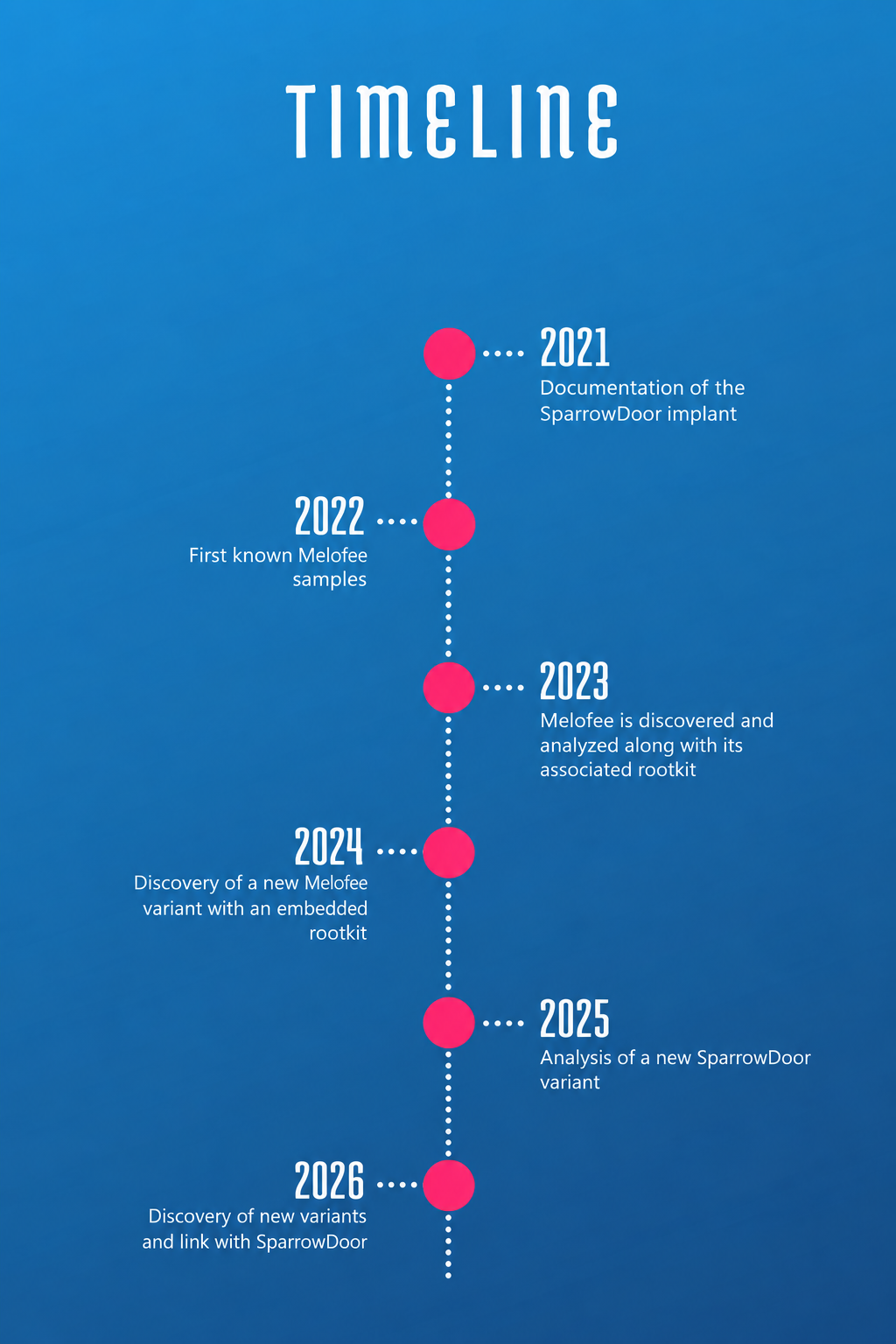
Researchers described Melofee as a malware family targeting Linux servers. It was attributed with a high confidence to attackers groups linked to China, especially players close to APT41 [1, 15].
The analyse of three samples discovered in 2022 highlighted the constant evolution of the Melofee implant, characterized by the progressive integration of a kernel rootkit, based on the open source project Reptile. This project was analyzed by AhnLab during July 2023 [3].
From this initial analysis, Melofee demonstrated several typical features of modern Linux implants:
- Remote command execution;
- File management;
- Interactive shell opening;
- System information collection;
- Communication with Command and Control (C2) servers;
- Persistence mechanisms.
The analysis of the Melofee-linked infrastructure also revealed links to several tools previously observed in campaigns attributed to Chinese APT groups, especially ShadowPad, HelloBot, PlugX, Spark, Cobalt Strike and StowAway [1, 11].
In November 2024, XLab (Qianxin) published an analysis [4] of a new variant targeting RHEL 7.9 system. This publication confirms that the implant continued to be developed since its discovery, with several technical evolutions detailed later in this document. The researchers also noticed the limited number of available samples, which suggests a use limited to specific targets.
Developments between the 2023 and 2024 versions
The core operating of the implant is similar across the versions. The same basic commands remain, with only a change of the command identifier numbers between versions.
However several changes come out between the 2023 samples and the 2024 observed variant:
- Process Management: the 2024 version adds commands to list and terminate processes;
- Persistence: the mechanism evolves with the use of crontab jobs and the use of a systemd service file masquerading as a legitimate vmware service;
- Kernel Driver Loading: the driver is now encrypted using RC4 and directly integrated into the main binary as an overlay, unlike previous versions where it was separately provided by the installer;
- Internal Code Modification: a few elements of the code have been renamed, suggesting a reorganization or a partial rebuild of the source code.
2026 new variants
Description
The analysis of three samples reveals that Melofee evolved from the previously observed versions. While the communication mechanisms and RC4 encryption remain similar, several changes have been identified, especially new features addition, the splitting into modules of certain features as dynamic libraries, and internal modifications on the implant. These changes are detailed in the following sections.
The implant contains a main module, which can execute a few basic commands. It is also capable of supporting additional features by downloading complementary modules from the C2 server.
The table below recaps all supported commands:
ID | Description | Observation |
Implant Basic Commands (Embedded Module 0x1000) | ||
0x1004 | Retrieving of the active C2 configuration. | |
0x1005 | Loading of a new C2 configuration, but without replacing the embedded configuration. | This command takes as a parameter a data structure containing up to three C2 configurations. |
0x1006 | Uninstalling the implant and deleting all the files it has create. | |
0x1007 | TCP proxy. | |
0x100A | Loaded modules inventory. | |
0x100B | Declared but not-implemented command. | |
0x100C | Module unloading. | This command takes as a parameter a module identifier (for instance 0x3000) |
0x100D | Forward server. | Already-existing feature. |
0x100E | Terminates all connections and interrupts the implant for a defined duration. | This command accepts a numerical parameter that represents the duration, in minutes, of the implant standby. |
Identifiers Used in Response (Handled by the C2 Server) | ||
0x1001 | Identifier used in a packet carrying victim-related information, awaiting the magic number returned by the C2 server to continue communication. | This identifier is generated transparently by the implant for each connection to the C2 server to initiate the communication. The attacker never has to issue this command. |
0x1002 | Identifier used by the module to request to the C2 server an additionnal module download. | This identifier is sent after a request from the operator. |
0x1003 | Monitoring signal (heartbeat). | The implant also sends the unique identifier based on the JSHash of the system information. |
Shell Module Commands (0x2000) | ||
0x2001 | Interactive shell interface. | |
Module Commands for the Files and Directories Management (0x3000) | ||
0x3002 | Enumerates the contents of a directory. | |
0x3003 | Deletes a file or a directory. | |
0x3004 | Creates a new directory. | |
0x3005 | Modifies creation, access and modification timestamps of files or directories. | |
0x3006 | Launches the download of a file from the attacker's server on the victim's host. | |
0x3007 | Launches the extract of a file from the victim's host into the attacker's server. | |
Module Command for Remote Collection (0x4000) | ||
0x4001 | Remote command execution. | |
Overall Operating
Implant Initialization Phase
The implant takes several command-line arguments:
/t:ensures persistence throughcrontab;/s:ensures malware persistence through a systemdservice;/r:runs the binary in deamon mode through a call todaemon;/u:uninstalls the implant and associated persistence files;hide:enables the rootkit's stealth feature;show:disables the rootkit's stealth feature.
During its execution, the implant carries out preparatory actions to establish its runtime environment in order to:
- Self-Referencing: the implant reads the file
/proc/self/exein order to retrieve its own execution path on the system; - Unique Instance Lock: the implant sets up a non-blocking mutex through the call to
flock()on a dedicated file (/tmp/lock_axin the analyzed samples). This mechanism prevents multiple instances to run simultaneously on the same host; - Kernel Compatibility Check: before loading the rootkit, the implant checks the runtime of the compromised host. It retrieves the Linux kernel's version through a call to
uname(), then it ensures that it is compatible with the rootkit. If not, the implant aborts the rootkit loading process. If it is compatible, it continues its execution. The rootkit supplies the stealth features used by the implant. The communication between the user process and the kernel module relies on aioctl()interface using the request code0xE0E0E0E.
The operating of this rootkit will not be detailed in this document, it has already been described by XLab Qianxin [4].
Information Gathering Phase
Before establishing any contact with the C2 server, the implant gathers infomation about the compromised host in order to create a host identification profile. This data collection provides to the operator a context about the infected host before the execution of the implant operational functions.
The implant first generates a unique host identifier using the JSHash algorithm (Justin Sobel [13]).
uint Calculate_JSHash(char *param_1, uint param_2)
{
uint local_c = 0x4e67c6a7;
for (uint i = 0; i < param_2; i++) {
local_c = local_c ^ (local_c >> 2) + local_c * 0x20 + (int)param_1[i];
}
return local_c;
}
This implementation uses the initialization constant 0x4E67C6A7. The hash value is calculated based on several system attributes gathered by the implant:
- The targetted operating system (in our case Linux);
- The Linux distrubution;
- The current user;
- The machine's hostname.
In addition to this identifier, the implant collects the following information:
- Hostname: collection of the machine's hostname;
- Current user: collection of the account associated with the active session;
- Linux distribution: operating system identification (through the read of the
/etc/issueor the/etc/redhat-releasefile); - Local IPv4 adresses: querying the network interfaces (through a call to the getifaddrs function);
- Target operating system: fixed value indicating the current environment (Linux);
- Timestamp: retrieval of the system date and hour through a call to
localtime(formatted as%m-%d-%Y %H:%M:%S).
All the collected information is then concatenated into a text string with tabulations:
<Machine_ID_JSHASH>\t<Hostname>\t<Username>\t<Distribution>\t<Local_IPs>\t<Platform>\t<Timestamp>
This host identification profile is sent to the C2 server on every connection. The implant does not only send it upon the first contact. It automatically repeats this data collection and sends it again after:
- A reconnection after a disconnection;
- Upon exiting sleep mode;
- Following a reboot of the implant.
Communication Protocols
To ensure connectivity, the implant has a fallback configuration containing up to three C2 server entries (each defined by a host, a port, and a protocol type). It attempts to connect to each entry sequentially until a connection is established, at which point it locks the active channel and aborts further attempts. Code analysis reveals distinct communication mechanisms for each entry type.
To ensure the link, the implant owns a fallback configuration that contains up to 3 C2 servers (defined by a host, a port, and a protocol type). It tries to connect successively to each one of them until the link is established, which freezes the active channel and interrupts all other attempts. The code analysis reveals multiple distinct communication mechanisms for those entries.
The following table summarizes the characteristics of each identified type:
Type | Name | Description |
1 / 5 | TcpConn | Classic TCP mode. The implant resolves the server address via getaddrinfo(), creates an IPv4 TCP socket, and establishes the connection using connect(). No preliminary exchange is performed. |
2 | HttpConn | TCP with application-layer minimal HTTP handshake. |
3 | HttpsConn | TLS with HTTP handshake. A TLS connection is established first, followed by an HTTP handshake (similar to Type 2), to validate the communication channel before C2 session initialization. |
4 | TlsConn | TCP-over-TLS. The TCP connection is encapsulated in TLS. Our network captures confirmed the use of TLS 1.2. |
Applicative Protocol Format
Each application-layer message follows a two-part structure:
┌───────────────────────────┬─────────────────────────┐
│ HEADER (16 octets, clair) │ PAYLOAD (N octets, RC4) |
└───────────────────────────┴─────────────────────────┘
The unencrypted header has the following structure:
struct PacketHeader {
uint32_t type; // Command Opcode
uint32_t length; // Payload Size
uint32_t param1; // Usage varying with command type
uint32_t param2; // Usage varying with command type
};
The last two fields serve as operands for specific instructions. For example, during a file download request, the fourth field contains the requested module identifier.
The optional payload, when present, is encrypted with RC4 using a static key embedded in the implant (e.g., Trbv5245GTF in the assessed samples).
Example 1: Module Download Request (0x1002)
The network packet looks like this:
00 00 10 02  00 00 00 00  00 00 00 02  00 00 30 00
└───type───┘└───length─┘ └───param1─┘  └───param2─┘
   0x1002         0            2           0x3000
During this request, the structure fields are populated as follows:
- Type: 0x1002 (response identifier expected by the implant);
- Payload size: 0 (no additional payload content);
- Parameter 1: 2 (fixed sub-command code);
- Parameter 2: Requested module identifier (here, 0x3000 for file management);
- Payload: Empty.
Example 2: File deletion (0x3003)
The network packet looks like this:
00 00 30 03  00 00 00 0d  00 00 00 00  00 00 00 00
└──type──┘   └─length─┘   └─param1─┘   └─param2─┘
 0x3003      13 octets       0           0
(DelFile)
Payload (13 octets, RC4(`/tmp/test.txt`))
Hexdump:
00000000  00 00 30 03 00 00 00 0d  00 00 00 00 00 00 00 00  |..0.............|
00000010  2f 74 6d 70 2f 74 65 73  74 2e 74 78 74           |/tmp/test.txt   |
Once the module is loaded into memory, calls to its internal functions follow a specific data structure. In this case, the "Parameter 1" and "Parameter 2" fields are set to 0, as the relevant data is carried in the payload. The latter contains the target file path (e.g., /tmp/test.txt), encrypted with RC4.
Example 3: The Record Packet
The network packet looks like this:
Header (16 bytes, clear):
00 00 10 01 00 00 00 8e 00 00 00 00 00 00 00 00
└──type──┘  └─length──┘ └─param1─┘  └─param2──┘
 0x1001      142(0x8e)       0           0
Payload (142 bytes, RC4 encryption), once decrypted :
1496026344	localhost.localdomain	root	Red Hat Enterprise Linux Server release 7.9 (Maipo)	127.0.0.1 192.168.100.128 	linux	08-02-2026 10:53:21
Hexdump:
00000000  00 00 10 01 00 00 00 8e  00 00 00 00 00 00 00 00  |................|
00000010  31 34 39 36 30 32 36 33  34 34 09 6c 6f 63 61 6c  |1496026344.local|
00000020  68 6f 73 74 2e 6c 6f 63  61 6c 64 6f 6d 61 69 6e  |host.localdomain|
00000030  09 72 6f 6f 74 09 52 65  64 20 48 61 74 20 45 6e  |.root.Red Hat En|
00000040  74 65 72 70 72 69 73 65  20 4c 69 6e 75 78 20 53  |terprise Linux S|
00000050  65 72 76 65 72 20 72 65  6c 65 61 73 65 20 37 2e  |erver release 7.|
00000060  39 20 28 4d 61 69 70 6f 29  09 31 32 37 2e 30 2e  |9 (Maipo).127.0.|
00000070  30 2e 31 20 31 39 32 2e 31  36 38 2e 31 30 30 2e  |0.1 192.168.100.|
00000080  31 32 38 20 09 6c 69 6e 75  78 09 30 38 2d 30 32  |128 .linux.08-02|
00000090  2d 32 30 32 36 20 31 30 3a  35 33 3a 32 31        |2026 10:53:21   |
This message allows the implant to report its host's characteristics and its unique identifier.
C2 Server Links Authentication
The implant validates its C2 connection in one or two steps, depending on the selected connection mode. These checks are strictly blocking: if any validation fails, the implant remains inactive and never executes any commands.
HTTP Pre-Connection Phase (Specific to HttpConn and HttpsConn Modes)
This application-layer exchange constitutes the first network contact over HTTP. The implant begins by sending a 17-bytes static string:
50 4f 53 54 20 2f 20 48 54 54 50 2f 31 2e 31 0d 0a
POST / HTTP/1.1\r\n   (17 bytes)
Hexdump:
00000000 50 4f 53 54 20 2f 20 48 54 54 50 2f 31 2e 31 0d |POST / HTTP/1.1.|
00000010 0a |.|
The C2 server must respond with exactly 17 bytes matching the following string:
48 54 54 50 2f 31 2e 31 20 32 30 30 20 4f 4b 0d 0a
HTTP/1.1 200 OK\r\n   (exactly 17 bytes)
Hexdump:
00000000  48 54 54 50 2f 31 2e 31  20 32 30 30 20 4f 4b 0d  |HTTP/1.1 200 OK.|
00000010  0a                                                |.               |
The binary checks are extremely strict. Code analysis shows that the implant first verifies the exact size of the received data (0x11 in hexadecimal, i.e., 17 bytes), and then performs a byte-by-byte memory comparison:
if (bytes_received == 0x11) {
iVar1 = memcmp(&http_buffer, "HTTP/1.1 200 OK\r\n", 0x11);
if (iVar1 == 0) {
If the received size and the content does not match, the implant closes the connection. This simple mechanism allows the implant to confirm it is communicating with its infrastructure.
Link Authentication (Common to All Modes)
This exchange is required for all communication mechanisms. It occurs immediately after the transmission of the initial record packet (see the 0x1001 packet structure below). The C2 server must respond with exactly 4 raw bytes, without a header or encryption:
11 22 33 44 (value 0x11223344 en network byte order)
Corresponding code:
BaseConn::recvn(pBVar5, &local_ec, 4, 60000); // Reads exactly 4 bytes, timeout 60s
if ((iVar3 == 0) && (my_htonl(local_ec) == 0x11223344))
If the four received bytes do not exactly match the expected constant, or if the 60-seconds timeout is exceeded, the implant immediately rejects the connection.
High-Level Overview
The overall architecture has remained unchanged since the 2023–2024 versions. However, the implant now includes additional features, as detailed below.
New Features Introduction
Active Network Configuration Retrieval
Identified by ID 0x1004, this feature retrieves the implant’s active network configuration and forwards the information to the Command and Control (C2) server.
New Network Configuration Loading
Identified by ID 0x1005, this feature dynamically loads a new C2 configuration without changing the embedded network configuration.
The diagram below illustrates how the implant loads a new network configuration:

The implant enforces a strict check on its configuration file:
- If the file size is exactly 228 bytes (0xE4), the implant loads the external file and applies the new configuration;
- If the size differs or the file is missing, the file is deemed invalid. The implant then rejects the change and falls back to the embedded configuration.
Dynamic Module Management
The implant employs a module system that allows it to dynamically load additional features. It is built around the following elements:
- A module identifier dynamically calculated using a bitmask: dwModuleID = dwCommandId & 0xF000;
- A linked list containing all loaded modules (initialized with the main embedded module, 0x1000);
- A common interface exposed by each module (detailed below).
In addition to the main module, the implant supports 11 modules, identified by IDs ranging from 0x2000 to 0xC000.
Static analysis of the implant also reveals multiple references to temporary paths used during dynamic module loading. Specifically, when an attacker deploys a module, it is written to a file following the naming pattern /tmp/PLGID.
The implant also includes two commands dedicated to plugin management:
- 0x100A – retrieves the list of currently active modules;
- 0x100C – removes a module without requiring a restart.
Module Downloading and Loading
The diagram below shows all steps of a module loading performed by the implant:

Known Modules
Our analysis identified three modules, corresponding to IDs 0x2000, 0x3000, and 0x4000. The remaining modules (IDs 0x5000 through 0xC000) could not be identified.
ID | File Name | SHA256 | Feature |
0x2000 | /tmp/2000 | cbce7dc8649b37c5db411dfee3a74e8cace2b48fdc8350bfa5b4846c5d9ed2ae | Interactive Shell |
0x3000 | /tmp/3000 | 9d01724193d9570a6c75bbcbb171d29df290207007d004cf75d133dd9aa475f4 | File Management |
0x4000 | /tmp/4000 | 129349a221e6efcc9a047efdfd81197f796fcf38877344f17f85651b21e33427 | Remote Command Execution |
Plugin Interface (Common to All Modules)
All assessed modules share a common structure and export a function named xmain, which serves as the entry point.
Each module implements the same interface (GetPlgInterface), consisting of three functions:
- GetPlugId – returns the module identifier;
- WritePlugin – called by the orchestrator, which passes it the command requested by the attacker along with some parameters;
- SetBackCall – allows the orchestrator to provide utility functions to each module (e.g., an interactive remote shell or network tunnel management).
All assessed modules also use the same class to handle their communications: BaseConn. This class relies on the SocketApi class that overloads standard libc functions.
Note that the implant's main module exposes a similar interface.
Interactive Shell Module (CShell)
Unlike in the 2023 and 2024 versions, where this capability was built in, remote command execution is now externalized as a dedicated module.
The module works by creating a pseudo-terminal (PTY) to provide a standard shell. It redirects incoming traffic, standard output, and error output to this PTY, then attempts to launch /bin/bash (automatically falling back to /bin/sh on failure). Before starting the shell, it sets the TERM and HISTFILE environment variables to configure terminal rendering and disable command history.
Files and Directories Management Module (CFile)
File handling capabilities, previously built into the Melofee implant (2023–2024 versions), are now externalized into a dedicated module.
This module provides the operator with the following capabilities:
- File and directory enumeration;
- File deletion;
- Directory creation;
- File timestamp modification;
- File upload to the compromised host;
- File download from the compromised host.
Remote Command Execution Module (CCmd)
Command execution, previously built into the main Melofee implant, is now externalized as a dedicated module. The component receives a command, executes it on the target host via a /bin/sh call, captures the standard and error output, and forwards the result to the C2 server.
Unlike the interactive shell module, this feature is strictly limited to utility commands and provides no interactive terminal.
Infrastructure
Our analysis revealed two infrastructure clusters associated with the implants; however, no other implants communicating with them were identified.
All IOCs we've identified are listed in the article's appendix.
Symantec Cluster
All IP addresses and domains used in recent samples' C2 exposed a common auto-signed certificate, with the Issuer field impersonating Symantec identity (C=US, ST=California, L=California, O=Symantec Corp).
Using the certificate SHA-1 footprint (dbbcb279a1f1a258832174ce63c295c5080de249) as a pivot, we could identify multiple C2 servers probably related to that threat.
Please note that TTPs consisting in using certificates that impersonate well-known security products, and domain names containing update, have already been documented for servers related to the ShadowPad tool [6].
Xdevops Cluster
Analysis of sample 4400096e8b39cb2641abec17c6dddad845ed6415e79d60adc2af1dcbd2837c59 revealed that the IP address resolved by the C2 server also served a self-signed certificate (Issuer: /C=US/ST=MI/L=Southfield/O=xdevops/OU=xdevops/CN=update.miss-soft[.]com, SHA-1: b6df18f66cf4364be2946d6b981e69763aafde68).
Pivoting on this certificate, we identified an additional activity cluster consisting of Amazon-like domains.
Similarities with Existing Malicious Code Families
The assessed Melofee samples during our investigations show many similarities with some existing implant families, although the latest targets Windows systems.
The merging families are the following:
- SparrowDoor / CrowDoor: a Windows implant family discovered by ESET in 2025, and linked with the attacker group FamousSparrow [5];
- TernDoor: an implant family possibly derived from CrowDoor, documented by Cisco Talos [7];
- Hemigate: an implant family shared by several attacker groups [8];
- LibreCoin/Ratels: an implant family probably linked to Hemigate [8, 11, 12].
The following similarities have been confirmed by our analysis:
- The use of the RC4 algorithm with a static key for configuration and communication ciphering/unciphering [5, 7, 8, 9, 11, 12];
- Configuration update mechanism within a ciphered file [5, 11];
- Implant global architecture functioning similarities; use of threads to parallelize commands, and events for syncronization [5, 8];
- Same communication protocols between Melofee, CrowDoor and RatelS [5, 8, 12];
- Module management mechanism which applies a bitmask on the command ID and chained list [5, 12];
- The export name used for modules loading is very similary: xmail for Melofee, fmain for RatelS and Crowdoor [5, 8, 11, 12];
- Interface exposed for each module (PluginInterface vs PlgInterface) [5].
Moreover, as displayed in the following table, the class names used in Crowdoor modules are identical:
CrowDoor Identifier | Melofee Identifier | Class Name used in CrowDoor Modules |
0x60000 | 0x2000 | CShell |
0x30000 | 0x3000 | CFile |
0x20000 | 0x4000 | CCmd |
We assess with high confidence that Melofee is closely related to these implant families and may have been developed by the same threat actor(s).
Furthermore, these similarities suggest probable tool sharing across multiple threat groups, a pattern already documented in several publications examining these implants [5, 7, 8, 9, 10, 11, 12].
Detection through Stormshield firewalls
Our Stormshield Network Security firewalls (SNS) contain multiple signatures dedicated to Melofee activity detection:
- ssl:server:certificate.107: Detection of the TLS certificate of a Melofee (APT41 / Winti) C2 server : a host is likely compromised;
- tcp:client:port.68: Malware: Melofee activity detected
SNS firewalls will rise alarms and block the network packets identified by those signatures, according to the IDS/IPS level configured.
You can find all risen alarms on the SNS interface, in the monitoring section - Logs/Audit Logs - Alarms [14].
Conclusion
Analysis of the new Melofee samples demonstrates that this implant family remains active and is still evolving three years after its initial disclosure.
The major developments identified, such as the modularization of functions historically integrated into the implant, and the addition of commands enabling remote reconfiguration of the C2 infrastructure, demonstrate a significant maturation of the tooling used by the attackers.
Furthermore, the structural similarities in the codebase reinforce the hypothesis of code sharing across multiple threat groups, likely tied to Chinese state actors. This convergence complicates defenders' tasks and undermines tool-based attribution.
References
- [1] ExaTrack, Mélofée: a new alien malware in the Panda's toolset targeting Linux hosts, March 28, 2023 - https://blog.exatrack.com/melofee/
- [2] Reptile rootkit - https://github.com/R3x/linux-rootkits/blob/main/Reptile/kernel/main.c
- [3] AhnLab ASEC, Reptile Malware Targeting Linux Systems, July 20, 2023 - https://asec.ahnlab.com/en/55785/
- [4] XLab (Qianxin), New Zero-Detection Variant of Melofee Backdoor from Winnti Strikes RHEL 7.9, November 12, 2024 - https://blog.xlab.qianxin.com/analysis_of_new_melofee_variant_en/
- [5] ESET Research, You will always remember this as the day you finally caught FamousSparrow, March 26, 2025 - https://www.welivesecurity.com/en/eset-research/you-will-always-remember-this-as-the-day-you-finally-caught-famoussparrow/
- [6] HuntIO , Tracking ShadowPad Infrastructure Via Non-Standard Certificates, Feb 9, 2024 - https://hunt.io/blog/tracking-shadowpad-infrastructure-via-non-standard-certificates
- [7] Cisco Talos, UAT-9244 targets South American telecommunication providers with three new malware implants, March 5, 2026 - https://blog.talosintelligence.com/uat-9244/
- [8] Cyber Defense Institute, Inc/TrendMicro, The Secret Life of RATs: connecting the dots by dissecting multiple backdoors, 2024 - https://jsac.jpcert.or.jp/archive/2024/pdf/JSAC2024_1_7_hara_nakajima_kawakami_en.pdf
- [9] ITOCHU Cyber & Intelligence Inc, Sequel: Gifts from Tropical Pirates - Who is the Sender? Look for the Attacker Group, 2023 - https://blog-en.itochuci.co.jp/entry/2023/10/06/173200
- [10] Daniel Lunghi , Leon M Chang, Trend Micro, The Rise of Collaborative Tactics Among China-aligned Cyber Espionage Campaigns, October 22nd, 2025 - https://www.trendaisecurity.com/en-us/resources-insights/trendai-security-blog/premier-pass-as-a-service
- [11] Yi-Chin Chuang, Yu-Tung Chang, Team T5, Unveiling TeleBoyi: Chinese APT Group Targeting Critical Infrastructure Worldwide, 2024 - https://jsac.jpcert.or.jp/archive/2024/pdf/JSAC2024_1_8_yi-chin_yu-tung_en.pdf
- [12] Yoshihiro Ishikawa, Takuma Matsumoto, LAC Co.,Ltd., New Modular Malware RatelS: Shades of PlugX - https://www.botconf.eu/botconf-presentation-or-article/new-modular-malware-ratels-shades-of-plugx/
- [13] General Purpose Hash Function Algorithms - https://www.partow.net/programming/hashfunctions/#JSHashFunction
- [14] Stormshield, Manuel Utilisateur SNS v4 - Logs-List of Views, 2026 - https://documentation.stormshield.eu/SNS/v4/fr/Content/User_Configuration_Manual_SNS_v4/Audit_Logs/Logs-List_of_Views.htm
- [15] APT41, MITRE ATT&CK® - https://attack.mitre.org/groups/G0096/
Appendices
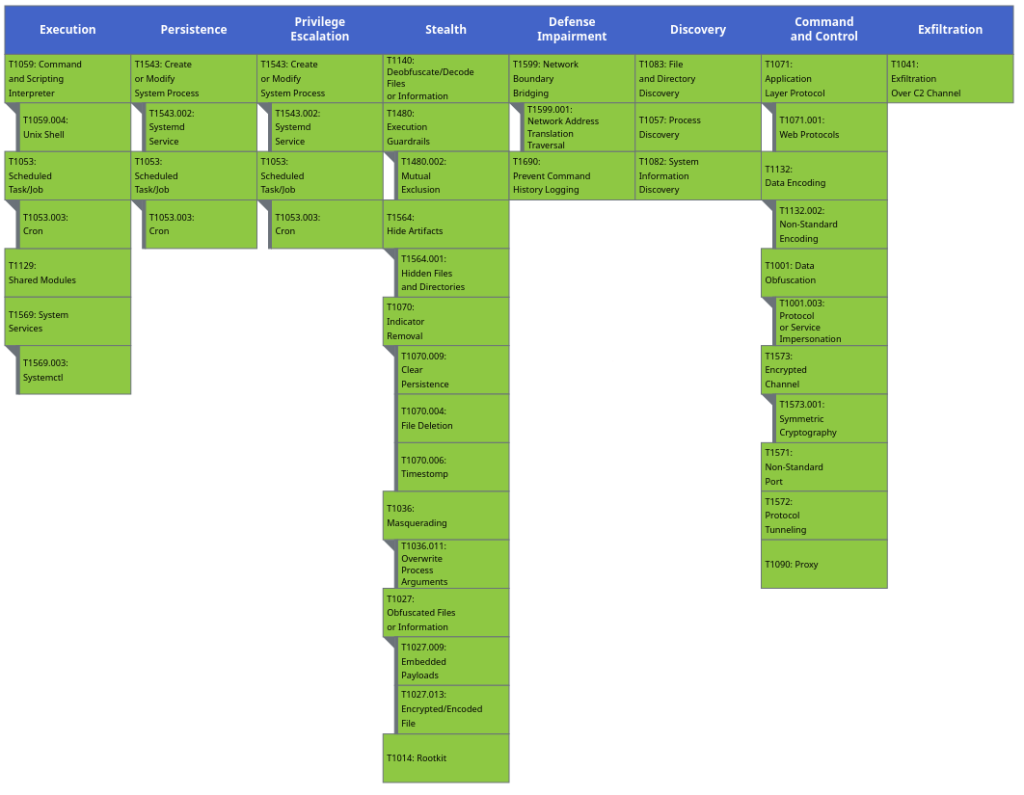
Observed Techniques Mapping (MITRE ATT&CK)
IOCs
Type | Usage | Value | Description and Notes |
Implants | |||
HASH | Backdoor | 8255d5a423ce79c69e42685cbf8e708b4239650c01b2898a7efe856582bb3aaf | Linux Implant |
HASH | Backdoor | dd081c130d7c3a3c18e06a26300dcfd65ee70e6b23b729edb54cb0f0a5829df9 | Linux Implant |
HASH | Backdoor | 50daadd49b8df4f0190d0badfde89f8e6a6e61af664ef1444984028a005f40d8 | Linux Implant |
HASH | Backdoor | 4400096e8b39cb2641abec17c6dddad845ed6415e79d60adc2af1dcbd2837c59 | Linux Implant (old version) |
Rootkits | |||
HASH | Rootkit | aa2fd252a6f5a09b8d8422fbd1037febefe2aa99317e3c3973889384a80e29b7 | Rootkit embedded within implant "50daadd49b8df4f0190d0badfde89f8e6a6e61af664ef1444984028a005f40d8" |
HASH | Rootkit | 6678216ace0ff224d6a5ae6bf1ca29e66fba9fceaa715e27440e85d5bfb06069 | Rootkit embedded within implant "dd081c130d7c3a3c18e06a26300dcfd65ee70e6b23b729edb54cb0f0a5829df9" |
Modules | |||
HASH | Module | 129349a221e6efcc9a047efdfd81197f796fcf38877344f17f85651b21e33427 | Remote commands execution module |
HASH | Module | 9d01724193d9570a6c75bbcbb171d29df290207007d004cf75d133dd9aa475f4 | Files/Folders management module |
HASH | Module | cbce7dc8649b37c5db411dfee3a74e8cace2b48fdc8350bfa5b4846c5d9ed2ae | Interactive Shell Module |
"Symantec" Infrastructure Cluster | |||
Domain | C2 | windefender[.]net:443 | Associated to implant "50daadd49b8df4f0190d0badfde89f8e6a6e61af664ef1444984028a005f40d8" |
Domain | C2 | www[.]windefender[.]net:443 | |
IP | C2 | 103[.]215[.]216[.]117:443 | Associated to implant "8255d5a423ce79c69e42685cbf8e708b4239650c01b2898a7efe856582bb3aaf" |
IP | C2 | 89[.]44[.]198[.]107:443 | |
IP | C2 | 92.38.169[.]152 | DNS domain resolution of windefender[.]net |
IP | C2 | 38.54.71[.]107 | DNS domain resolution of windefender[.]net (with certificate exposed dbbcb279a1f1a258832174ce63c295c5080de249) |
IP | C2 | 130.94.91[.]53 | DNS domain resolution of windefender[.]net (with certificate exposed dbbcb279a1f1a258832174ce63c295c5080de249) |
IP | C2 | 38.54.71[.]56 | DNS domain resolution of windefender[.]net (with certificate exposed dbbcb279a1f1a258832174ce63c295c5080de249) |
Domain | C2 | windowsupdates[.]us:80 | Associated to implant "dd081c130d7c3a3c18e06a26300dcfd65ee70e6b23b729edb54cb0f0a5829df9" |
IP | C2 | 45[.]80[.]208[.]232:80 | |
IP | C2 | 185.163.2[.]100 | Probable C2 (with certificate exposed dbbcb279a1f1a258832174ce63c295c5080de249) |
Domain | C2 | microsoftupdates[.]top | Domain resolving to 180.149.44[.]110 |
IP | C2 | 180.149.44[.]115 | Probable C2 (with certificate exposed dbbcb279a1f1a258832174ce63c295c5080de249) |
Domain | C2 | windowsupdates[.]us | Domain resolving to 180.149.44[.]115 |
IP | C2 | 103.215.216[.]181 | Probable C2 (with certificate exposed dbbcb279a1f1a258832174ce63c295c5080de249) |
Domain | C2 | microupdate[.]top | Domain resolving to 103.215.216[.]181 |
IP | C2 | 103.215.216[.]75 | Probable C2 (with certificate exposed dbbcb279a1f1a258832174ce63c295c5080de249) |
IP | C2 | 103.215.216[.]117 | Probable C2 (with certificate exposed dbbcb279a1f1a258832174ce63c295c5080de249) |
IP | C2 | 103.215.216[.]116 | Probable C2 (with certificate exposed dbbcb279a1f1a258832174ce63c295c5080de249) |
IP | C2 | 103.215.216[.]27 | Probable C2 (with certificate exposed dbbcb279a1f1a258832174ce63c295c5080de249) |
Domain | C2 | microupdate[.]me | Domain resolving to 103.215.216[.]27 |
IP | C2 | 46.246.98[.]131 | Probable C2 (with certificate exposed dbbcb279a1f1a258832174ce63c295c5080de249) |
IP | C2 | 185.163.2[.]34 | Probable C2 (with certificate exposed dbbcb279a1f1a258832174ce63c295c5080de249) |
IP | C2 | 185.163.2[.]79 | Probable C2 (with certificate exposed dbbcb279a1f1a258832174ce63c295c5080de249) |
IP | C2 | 185.163.2[.]81 | Probable C2 (with certificate exposed dbbcb279a1f1a258832174ce63c295c5080de249) |
IP | C2 | 23.95.34[.]184 | Probable C2 (with certificate exposed dbbcb279a1f1a258832174ce63c295c5080de249) |
IP | C2 | 172.86.114[.]201 | Probable C2 (with certificate exposed dbbcb279a1f1a258832174ce63c295c5080de249) |
IP | C2 | 130.94.91[.]165 | Probable C2 (with certificate exposed dbbcb279a1f1a258832174ce63c295c5080de249) |
IP | C2 | 103.87.9[.]148 | Probable C2 (with certificate exposed dbbcb279a1f1a258832174ce63c295c5080de249) |
IP | C2 | 45.67.230[.]185 | Probable C2 (with certificate exposed dbbcb279a1f1a258832174ce63c295c5080de249) |
IP | C2 | 154.205.137[.]88 | Probable C2 (with certificate exposed dbbcb279a1f1a258832174ce63c295c5080de249) |
IP | C2 | 146.71.85[.]33 | Probable C2 (with certificate exposed dbbcb279a1f1a258832174ce63c295c5080de249) |
IP | C2 | 103.215.216[.]162 | Probable C2 (with certificate exposed dbbcb279a1f1a258832174ce63c295c5080de249) |
IP | C2 | 103.215.216[.]61 | Probable C2 (with certificate exposed dbbcb279a1f1a258832174ce63c295c5080de249) |
IP | C2 | 180.149.44[.]43 | Probable C2 (with certificate exposed dbbcb279a1f1a258832174ce63c295c5080de249) |
"xdevops" Infrastructure Cluster | |||
Domain | C2 | awsclouds.awspull[.]com | Associated to implant "4400096e8b39cb2641abec17c6dddad845ed6415e79d60adc2af1dcbd2837c59" |
IP | C2 | 192.3.55[.]220 | Associated to implant "4400096e8b39cb2641abec17c6dddad845ed6415e79d60adc2af1dcbd2837c59", that resolved the domain awsclouds.awspull[.]com and exposed the certificate 0c1666b274ddb44dd5c7a11f03c8c041f6bccf0c7dae924626ef9d15b1cc41d5 |
IP | C2 | 38.54.110[.]44 | Probable C2 (with certificate exposed b6df18f66cf4364be2946d6b981e69763aafde68) |
IP | C2 | 45.61.148[.]33 | Probable C2 (with certificate exposed b6df18f66cf4364be2946d6b981e69763aafde68) |
IP | C2 | 2.56.166[.]139 | Probable C2 (with certificate exposed b6df18f66cf4364be2946d6b981e69763aafde68) |
Domain | C2 | update.wwwubuntu[.]com | Probable C2 (that resolved to multiple addresses IP resolved to 38.54.110[.]44, 45.61.148[.]33, 2.56.166[.]139) |
IP | C2 | 2.56.166[.]84 | Probable C2 (with certificate exposed b6df18f66cf4364be2946d6b981e69763aafde68) |
Domain | C2 | amzaonaws[.]org | Probable C2 (that resolved to 2.56.166[.]84) |
Files | |||
Path | IOC | /tmp/lock_ax | Mutex used by the implant |
Path | IOC | /tmp/[ID] | Temporary file used to store modules (ID between 2000 et c000) |
Path | IOC | /etc/systemd/system/vmware.service | File used for persistence |
Path | IOC | /tmp/.mpwzlof | File used for persistence installation |
Process Name | IOC | [md] | Processus name (kernel excepted) |
Signatures Yara and Sigma
Yara Signatures
rule UNK_APT_MelofeeImplant_2026
{
meta:
description = "Detects Melofee Linux implant"
author = "romain.carette - (Stormshield CTI)"
family = "Melofee"
hashes = "50daadd49b8df4f0190d0badfde89f8e6a6e61af664ef1444984028a005f40d8,dd081c130d7c3a3c18e06a26300dcfd65ee70e6b23b729edb54cb0f0a5829df9,8255d5a423ce79c69e42685cbf8e708b4239650c01b2898a7efe856582bb3aaf"
created = "2026-08-15"
modified = "2026-09-02"
score = 100
tlp = "TLP-CLEAR"
strings:
$sym_xmain = "xmain" ascii
// This functionality allows incoming TCP traffic to be redirected to a local port and is used by Melofee to implement a network redirection mechanism.
$iptables_add = "iptables -t nat -A PREROUTING -p tcp -s %s --dport %d -j REDIRECT --to-port %d" ascii
$iptables_del = "iptables -t nat -D PREROUTING -p tcp -s %s --dport %d -j REDIRECT --to-port %d" ascii
$pevents_src = "pevents.cpp" ascii

$pevents_ns1 = "neosmart::CreateEventx" ascii

$pevents_ns2 = "neosmart::WaitForMultipleEvents" ascii
$code_initmod = {
b9 ?? ?? ?? ??

48 89 da

48 89 c6

bf af 00 00 00

b8 00 00 00 00

e8
}
$code_selfdelete = {
bf ?? ?? ?? ??

e8 ?? ?? ?? ??

89 45 ??

83 7d ?? 00

0f 8e ?? ?? ?? ??

8b 45 ??

48 98

c6 84 05 ?? ?? ?? ?? 00
}
condition:
uint32(0) == 0x464c457f and

3 of them
}
rule UNK_APT_MelofeeImplantLib

{
meta:
description = "Detects plugin libraries (.so) of the Melofee Linux implant family"

author = "romain.carette - Stormshield CTI"

date = "2026-08-24"

malware_family = "Melofee"

hashes = "9d01724193d9570a6c75bbcbb171d29df290207007d004cf75d133dd9aa475f4,cbce7dc8649b37c5db411dfee3a74e8cace2b48fdc8350bfa5b4846c5d9ed2ae,129349a221e6efcc9a047efdfd81197f796fcf38877344f17f85651b21e33427"

created = "2026-08-15"

modified = "2026-09-02"

score = 100

tlp = "TLP-CLEAR"
strings:
// SocketApi network layer

$sock1 = "_ZN9SocketApi7ConnectEiPK8sockaddri" ascii

$sock2 = "_ZN9SocketApi6SocketEiiiRi" ascii

$sock3 = "_ZN9SocketApi6ListenEii" ascii

$sock4 = "_ZN9SocketApi6AcceptEiP8sockaddrPiRi" ascii

$sock5 = "_ZN9SocketApi4SendEiPKviRi" ascii

$sock6 = "_ZN9SocketApi4RecvEiPviRi" ascii

$sock7 = "_ZN9SocketApi4PeekEiPviRi" ascii

$sock8 = "_ZN9SocketApi4BindEiPK8sockaddri" ascii

$sock9 = "_ZN9SocketApi13GetAddrInfo_xEPKcS1_PK8addrinfoPPS2_" ascii

$sock10 = "_ZN9SocketApi18FreeAddrInfoWrap_xEP8addrinfo" ascii

$sock11 = "_ZN9SocketApi11GetsocknameEiP8sockaddrPi" ascii

$sock12 = "_ZN9SocketApi11GetpeernameEiP8sockaddrPi" ascii

$sock13 = "_ZN9SocketApi5CloseEi" ascii
// BaseConn connection wrapper

$conn1 = "_ZN8BaseConn5sendnEPvi" ascii

$conn2 = "_ZN8BaseConn5recvnEPvim" ascii

$conn3 = "_ZN8BaseConn4peekEPviRim" ascii

$conn4 = "_ZTI8BaseConn" ascii

$conn5 = "_ZTV8BaseConn" ascii
// Packet handling + RC4

$pkt1 = "_Z11WritePacketSt10shared_ptrI8BaseConnEP9_PkHeaderSs" ascii

$pkt2 = "_Z10ReadPacketSt10shared_ptrI8BaseConnEP9_PkHeaderRSs" ascii

$rc4_1 = "_Z6re_RC4PhPc" ascii

$rc4_2 = "_Z7re_SboxPhS_" ascii

$rc4_3 = "_Z5RC4_2Pci" ascii

$rc4_4 = "_Z3RC4PciS_" ascii
// Network helpers

$hton1 = "_Z9my_htonllm" ascii

$hton2 = "_Z8my_htonst" ascii

$hton3 = "_Z8my_htonlj" ascii
// Shared internal string utilities

$util1 = "_Z5splitRKSsS0_RSt6vectorISsSaISsEE" ascii

$util2 = "_Z4joinRKSt6vectorISsSaISsEERKSs" ascii
// Plugin entry point symbol

$entry = "xmain" ascii fullword
condition:
uint32(0) == 0x464c457f and // ELF magic

uint16(16) == 3 and // e_type == ET_DYN (shared object)

(
6 of ($sock*)

or 2 of ($conn*)

or 10 of them

or ($entry and 2 of ($sock*, $conn*))
)
}
Sigma Signature
title: Detection of temporary files used by Mélofée for module storage
id: 8e6f2a3c-4b7d-4e1a-9c2f-5d8a1b3e7f90
status: experimental
description: Detects the creation, in /tmp/, of temporary files whose names correspond to a hexadecimal identifier. These files are used to store modules/plugins that will subsequently be loaded via dlopen. The filename corresponds to a hexadecimal identifier ranging from 0x2000 to 0xC000.
references:
- Stormshield CTI Internal Analysis – Mélofée Linux Implant
author: romain.carette - (Stormshield CTI)
date: 2026-08-26
tags:
logsource:
product: linux

category: file_event
detection:
selection:
TargetFilename|re: '^/tmp/[2-9a-cA-C]000$'
condition: selection
falsepositives:
- Legitimate temporary files with randomly generated hexadecimal names (rare but possible)
level: medium